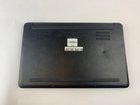
Razer Blade Stealth 2016 Hard Drive Replacement

Lindsay Grant and 7 other contributors
Last updated on Nov 15, 2022
Views: 3.7K
View statistics:
- Past 24 Hours:
- 2
- Past 7 Days:
- 19
- Past 30 Days:
- 70
- All Time:
- 3,737
Comments: 0
No one has left comments on this guide. Will you be first?
Go to guide commentsCompleted: 1 2
1 person has marked this guide "completed." Will you be next?
2 people have marked this guide "completed." Including you — great job!
Favorites: 0 1
No one has favorited (and subscribed to) this guide. Will you be the first?
1 person has favorited (and subscribed to) this guide — and that's you!
Needs More Images
A few more images would make this guide's procedures crystal clear.
Introduction
Go to step 1 ↓The hard drive is vital in any laptop as it stores all your data and if it does not work properly then you can lose out on all your important photos and data.
The hard drive might not be functioning correctly if your laptop says there is no hard drive detected or the computer crashes constantly.
Follow this guide to replace the hard drive on your Razer Blade Stealth 2016.
Make sure the laptop is powered off before beginning this guide.
What you need
Fix Kit
This kit contains all the parts and tools needed to complete this guide.

Parts


Tools


-
-
-
There are 10 screws in total, they can be found at the red circles shown in the picture!
-
-
-
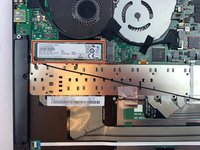
The hard drive is located under the fan on the left side as shown in the picture!
-
-
-
The hard drive is located under the fan on the left side.
-
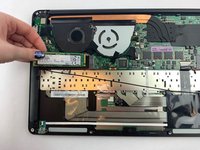
Slowly peel back the silver piece and black tape beneath it to reveal the hard drive.
-
-
-
-
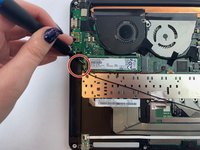
Using a Phillips screwdriver, remove the 2.5 mm screw on the left side of the hard drive.
-
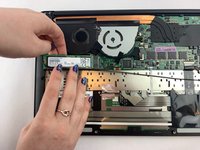
After you unscrew the hard drive, it will pop out by itself
-

 Ask FixBot




To reassemble your device, follow these instructions in reverse order.
Cancel: I did not complete this guide.
One other person completed this guide.

Team

USF Tampa, Team S1-G4, Leahy Fall 2019 Member of USF Tampa, Team S1-G4, Leahy Fall 2019
USFT-LEAHY-F19S1G4
4 Members
60 Guides authored
