Introduction
This repair guide will show you how to replace the battery from your Razer Barracuda X headphones.
If the battery is swollen, take precautions.
Attempt to dispose of the battery responsibly (It may be the law in your area).
For best results, after installing a new battery, calibrate it.
What you need
-
-
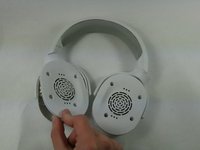
Remove the cushion by pulling it off from the edge and out from the grooves.
-
Continue to pull the cushion away from the speaker until the cushion is fully separated.
 Ask FixBot
-
-
-
Remove the four 6 mm Phillips #1 screws from the left side of the speaker casing.
-
-
-
-
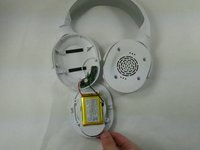
Gently pull the speaker casing away from the shell.
-
Place it face down to access the battery.
-
-
-
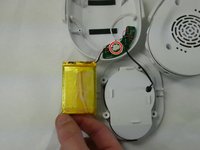
Unplug the battery from the socket.
-
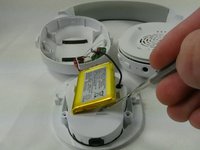
Use a spudger to gently lift the battery up.
-
Remove the battery.
-




To reassemble your device, follow the above steps in reverse order.
For optimal performance, after completing this guide, calibrate your newly installed battery.
Take your e-waste to an R2 or e-Stewards certified recycler.
Repair didn’t go as planned? Try some basic troubleshooting or ask our Answers community for help.
Cancel: I did not complete this guide.
6 other people completed this guide.

Team

UMass Dartmouth, Team 2-3, Petersen Fall 2022 Member of UMass Dartmouth, Team 2-3, Petersen Fall 2022
UMASSD-PETERSEN-F22S2G3
4 Members
10 Guides authored
8 Guide Comments
What is the voltage of the battery?
It’s a 3.7V battery.
Si, 3,7 v se ve muy mal en la foto del Paso 4
How small is that battery?? i took mine apart and i saw i got the wrong size battery in general.
