Introduction
If your device is making a "clunk" noise, you may have an issue with the drive shaft. Another sign could be the trigger sticking. If your device is sputtering or is having issues with the trigger then it could be due to the drive shaft. The drive shaft makes the blade spin. It’s also powered by the motor. You need to take apart your device and check the driveshaft. If the issues isn’t found within the driveshaft, then it could be the motor. If it’s the motor, check the motor replacement guide.
What you need
-
-
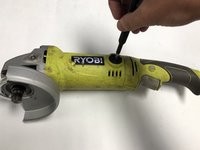
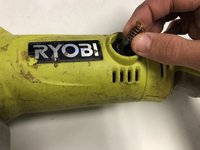
Remove the brush caps from each side of the body using the 4 mm flat head screwdriver.
 Ask FixBot
-
-
-
-
Remove the four 20mm screws that secures the gear box using a Phillips #1 screwdriver.
-




To reassemble your device, follow these instructions in reverse order.

Team

Embry-Riddle Aeronautical University, Team S12-G4, Lamothe Fall 2019 Member of Embry-Riddle Aeronautical University, Team S12-G4, Lamothe Fall 2019
ERAU-LAMOTHE-F19S12G4
4 Members
6 Guides authored
