
RYOBI AG454 Blade Replacement

Erica Faulkner and 2 other contributors
Last updated on Dec 12, 2019
Views: 2.9K
View statistics:
- Past 24 Hours:
- 4
- Past 7 Days:
- 16
- Past 30 Days:
- 94
- All Time:
- 2,891
Comments: 0
No one has left comments on this guide. Will you be first?
Go to guide commentsCompleted: 0 1
No one has marked this guide "completed." Will you be the first?
1 person has marked this guide "completed." It's you — great job!
Favorites: 0 1
No one has favorited (and subscribed to) this guide. Will you be the first?
1 person has favorited (and subscribed to) this guide — and that's you!
Introduction
Go to step 1 ↓If the blade of your angel grinder is worn out, it is probably due for replacement. This guide will go over how to detect problems with the blade and how to fix those issues. A couple things to note before proceeding with this guide:
- Our device didn’t come equipped with a blade, so you may need to take extra steps to remove the blade from your device.
- The tools used in this guide are attached to the device itself, so you won’t be needing any extra tools for this guide.
-
-
-
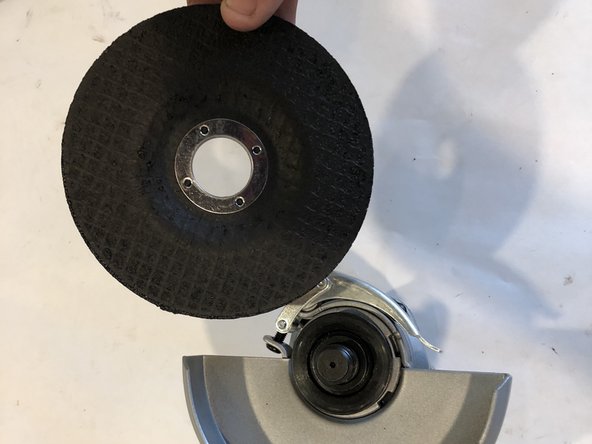
Ensure that the spindle lock is engaged.
-
Remove the clamp nut from top of disc with wrench that's located inside the handle.
-
-

 Ask FixBot


To reassemble your device, follow these instructions in reverse order.

Team

Embry-Riddle Aeronautical University, Team S12-G4, Lamothe Fall 2019 Member of Embry-Riddle Aeronautical University, Team S12-G4, Lamothe Fall 2019
ERAU-LAMOTHE-F19S12G4
4 Members
60 Guides authored
