Free Shipping on Domestic Orders $75+

ROG Strix GTX 1080 Ti Fan Replacement

What you need

    1. ROG Strix GTX 1080 Ti Fan Replacement, Fan and RGB cables: step 1, image 1 of 1
      • Make sure to ground yourself and your work space to avoid frying the graphics card.

      • Unplug the fan wiring harness and the RGB cable from the mainboard.

      Ask FixBot

      Add Comment

    2. ROG Strix GTX 1080 Ti Fan Replacement, Fan shroud: step 2, image 1 of 1
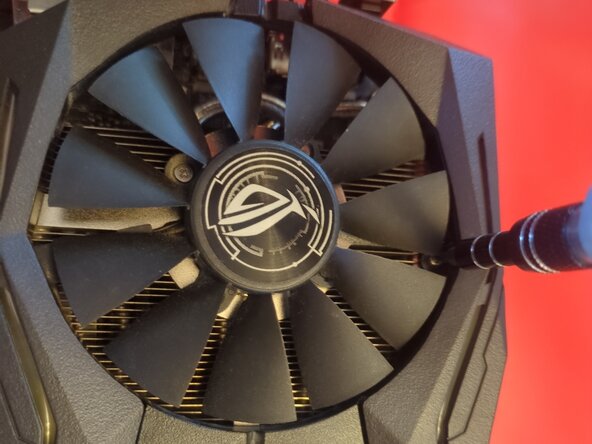
      • Unscrew the three screws in the top of the fan shroud.

      • These are obscured slightly by the fan blades. Just turn the fans slightly to reach them.

      Ask FixBot

      Add Comment

    3. ROG Strix GTX 1080 Ti Fan Replacement, Fan shroud continued: step 3, image 1 of 1
      • Unscrew the three screws holding the fan shroud to the side of the heat sink.

      • Carefully lift the fan shroud off the heat sink.

      Ask FixBot

      Add Comment

      • There are metal brackets on the heatsink that help keep the fan cables in place. Settle the cables into them neatly when reassembling, or the fan shroud won't fit back on.

      • The three fans are not identical, so make sure to get the correct replacement(s).

      • Each fan is individually attached to the heatsink. Rotate the fan blades to access and unscrew the five screws from each fan.

      • Each fan also plugs into the fan wiring harness individually.

      Ask FixBot

      Add Comment

      • Unplug the fans from the wiring harness.

      • When reassembling, plug the fan cables into their matching connectors on the wiring harness before screwing them to the heatsink, to avoid installing them in the wrong positions.

      Ask FixBot

      Add Comment

      • Clean the fans and/or the inside of the fan shroud before reassembly.

      Ask FixBot

      Add Comment

Conclusion

To reassemble your device, follow these instructions in reverse order.

Cancel: I did not complete this guide.

Sparky

Member since: 03/15/26

1,731 Reputation

12 Guides authored

0 Guide Comments

Add Comment

View Statistics:

Past 24 Hours: 4

Past 7 Days: 25

Past 30 Days: 108

All Time: 190