Free Shipping on Domestic Orders $75+

Qualcomm Snapdragon 800 Mobile Development Antenna Replacement

What you need

    1. Qualcomm Snapdragon 800 Mobile Development Antenna Replacement, Battery: step 1, image 1 of 2 Qualcomm Snapdragon 800 Mobile Development Antenna Replacement, Battery: step 1, image 2 of 2
      • Locate your device.

      • Flip device onto its back.

      Ask FixBot

      Add Comment

    2. Qualcomm Snapdragon 800 Mobile Development Antenna Replacement: step 2, image 1 of 1
      • Remove the tablet's back cover.

      Ask FixBot

      Add Comment

    3. Qualcomm Snapdragon 800 Mobile Development Antenna Replacement: step 3, image 1 of 1
      • Locate the battery and remove it.

      • If you wish to replace the battery you can do so here.

      Ask FixBot

      Add Comment

    1. Qualcomm Snapdragon 800 Mobile Development Antenna Replacement, Back Panel: step 4, image 1 of 2 Qualcomm Snapdragon 800 Mobile Development Antenna Replacement, Back Panel: step 4, image 2 of 2
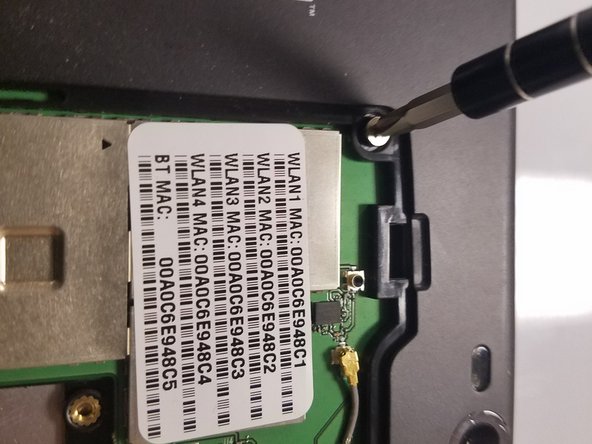
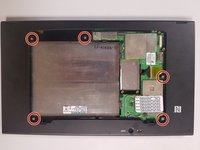
      • Use the Phillips PH1 screwdriver to unscrew the five 4x2.5mm screws that hold the back cover.

      Ask FixBot

      Add Comment

    2. Qualcomm Snapdragon 800 Mobile Development Antenna Replacement: step 5, image 1 of 1
      • Pop out the back cover.

      Ask FixBot

      Add Comment

    1. Qualcomm Snapdragon 800 Mobile Development Antenna Replacement, Antennas: step 6, image 1 of 1
      • After removing the panel and the battery, your tablet should look like this.

      Ask FixBot

      Add Comment

    2. Qualcomm Snapdragon 800 Mobile Development Antenna Replacement: step 7, image 1 of 2 Qualcomm Snapdragon 800 Mobile Development Antenna Replacement: step 7, image 2 of 2
      • Locate the tablet's antennas.

      • Remove the two 3x2.5mm screws holding them down.

      Ask FixBot

      Add Comment

    3. Qualcomm Snapdragon 800 Mobile Development Antenna Replacement: step 8, image 1 of 1
      • Remove antennas and replace them as needed.

      Ask FixBot

      Add Comment

Conclusion

To reassemble your device, follow these instructions in reverse order.

Cancel: I did not complete this guide.

2 other people completed this guide.

0 Guide Comments

Add Comment

View Statistics:

Past 24 Hours: 3

Past 7 Days: 25

Past 30 Days: 90

All Time: 689