Free Shipping on Domestic Orders $75+

Punkt MP02 Screen Replacement

Views: 259

View statistics:

Past 24 Hours:
3
Past 7 Days:
12
Past 30 Days:
81
All Time:
259
Comments: 4

2 comments on steps, 2 guide comments.

Go to guide comments
Completed: 0

No one has marked this guide "completed." Will you be the first?

Favorites: 0

No one has favorited (and subscribed to) this guide. Will you be the first?

Time Required: 45 minutes - 1 hour
Difficulty: Moderate
Punkt MP02 Screen Replacement

Introduction

Go to step 1 ↓

If your phone's screen seems to stop functioning, cracks, or breaks, you can follow this guide to replace the screen display. Unless the screen is physically broken, check your phone's software to ensure the error is happening within the screen and not the phone itself.

What you need

Tools

    1. Punkt MP02 Screen Replacement, Battery: step 1, image 1 of 2 Punkt MP02 Screen Replacement, Battery: step 1, image 2 of 2
      • Use a SIM card eject tool to to eject and remove the SIM card tray on the side of the phone.

      Ask FixBot

      Add Comment

    2. Punkt MP02 Screen Replacement: step 2, image 1 of 2 Punkt MP02 Screen Replacement: step 2, image 2 of 2
      • The back panel is held on by glue and multiple tabs.

      • Slide a Jimmy into the seam between the back panel and the chassis.

      • Slide the Jimmy around the perimeter to release the back panel, with care not to damage the retaining clips.

      • Clean any old adhesive with a spudger and isopropyl alcohol, then apply new adhesive to the back panel before reinstalling it.

      Ask FixBot

      Add Comment

    3. Punkt MP02 Screen Replacement: step 3, image 1 of 3 Punkt MP02 Screen Replacement: step 3, image 2 of 3 Punkt MP02 Screen Replacement: step 3, image 3 of 3
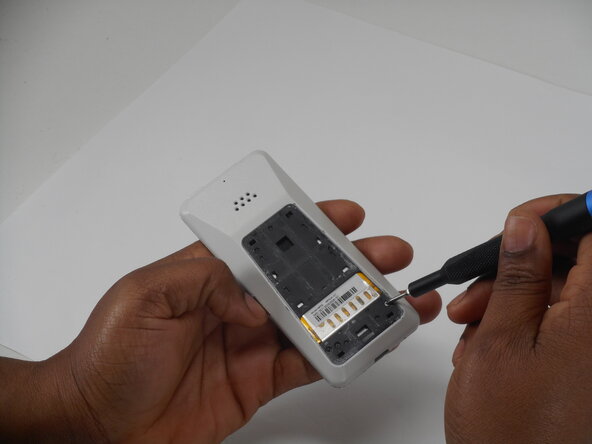
      • Use a Phillips screwdriver to remove the two adjacent 3 mm Phillips screws.

      Ask FixBot

      Add Comment

    4. Punkt MP02 Screen Replacement: step 4, image 1 of 3 Punkt MP02 Screen Replacement: step 4, image 2 of 3 Punkt MP02 Screen Replacement: step 4, image 3 of 3
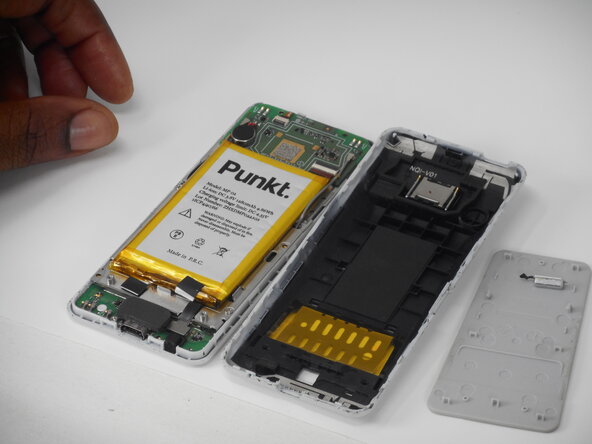
      • Insert a Jimmy into the seam between the front and back case.

      • Slide the Jimmy around the perimeter while prying to separate the front and back case.

      Ask FixBot

      Add Comment

    5. Punkt MP02 Screen Replacement: step 5, image 1 of 2 Punkt MP02 Screen Replacement: step 5, image 2 of 2
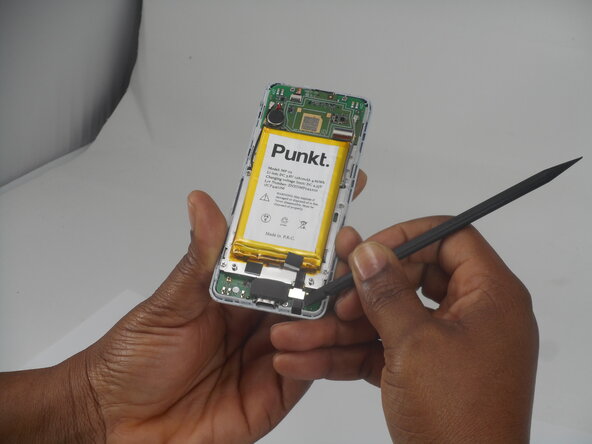
      • Use a spudger to pry up and disconnect the battery press connector.

      • Make sure to pry under the connector itself and not on the board.

      Ask FixBot

      Add Comment

    6. Punkt MP02 Screen Replacement: step 6, image 1 of 2 Punkt MP02 Screen Replacement: step 6, image 2 of 2
      • Gently pry the battery off with the spudger tool.

      • Take care not to bend, warp, or puncture the battery during removal.

      Ask FixBot

      Add Comment

    1. Punkt MP02 Screen Replacement, Screen: step 7, image 1 of 3 Punkt MP02 Screen Replacement, Screen: step 7, image 2 of 3 Punkt MP02 Screen Replacement, Screen: step 7, image 3 of 3
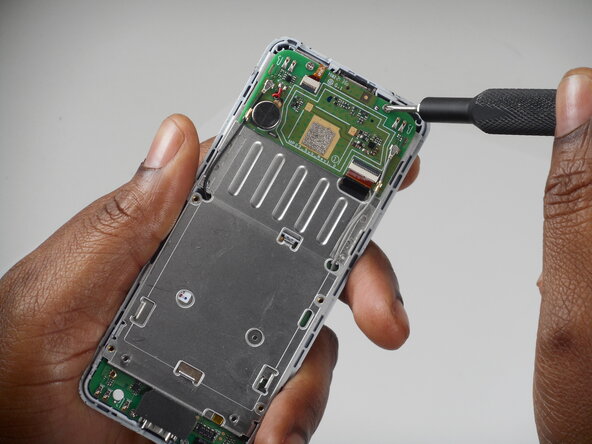
      • Remove the six 3 mm-long Phillips screws located on the board beneath the battery.

      Ask FixBot

      Add Comment

    2. Punkt MP02 Screen Replacement: step 8, image 1 of 3 Punkt MP02 Screen Replacement: step 8, image 2 of 3 Punkt MP02 Screen Replacement: step 8, image 3 of 3
      • Remove the antenna coaxial connectors on the board with a spudger by gently prying straight up where they are connected on the board.

      Ask FixBot

      Add Comment

    3. Punkt MP02 Screen Replacement: step 9, image 1 of 3 Punkt MP02 Screen Replacement: step 9, image 2 of 3 Punkt MP02 Screen Replacement: step 9, image 3 of 3
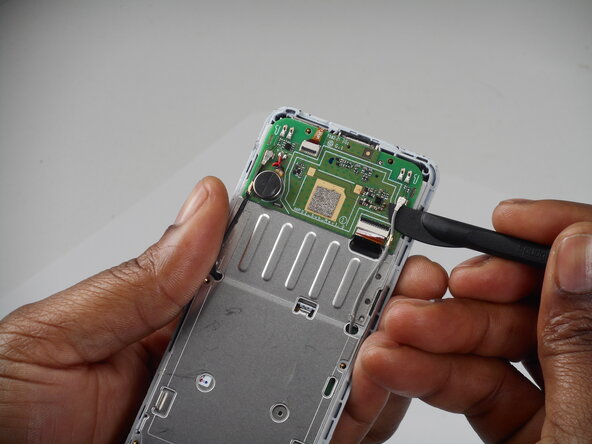
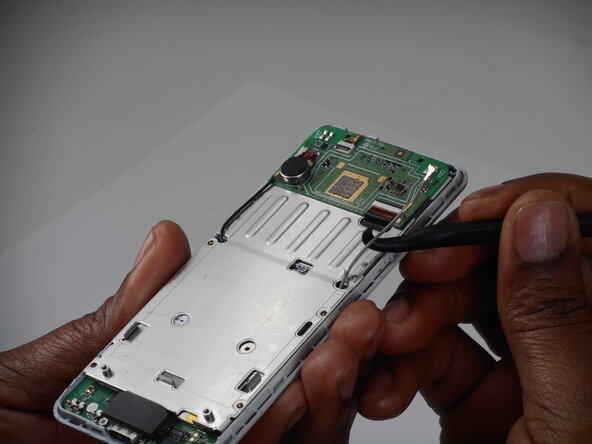
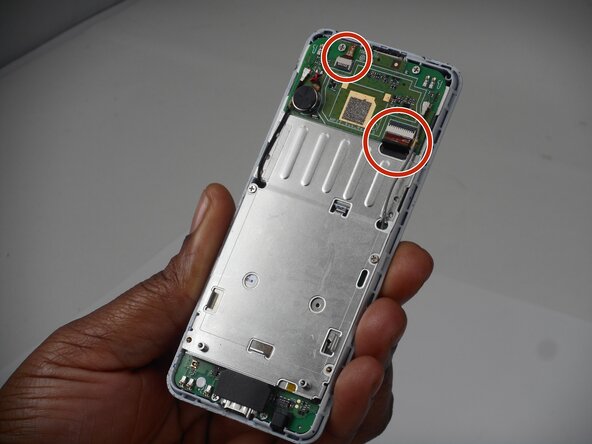
      • Flip up the two black locking flaps securing each of the two ribbon cables.

      • Disconnect the two ribbon cables.

      Ask FixBot

      Add Comment

    4. Punkt MP02 Screen Replacement: step 10, image 1 of 2 Punkt MP02 Screen Replacement: step 10, image 2 of 2
      • Using your thumbs, push the board up so that the clip can slide out of the indent.

      • Use a spudger to gently separate the boards.

      • Ensure that the antennae slide through the holes—do not accidentally pull these off.

      Ask FixBot

      Add Comment

    5. Punkt MP02 Screen Replacement: step 11, image 1 of 3 Punkt MP02 Screen Replacement: step 11, image 2 of 3 Punkt MP02 Screen Replacement: step 11, image 3 of 3
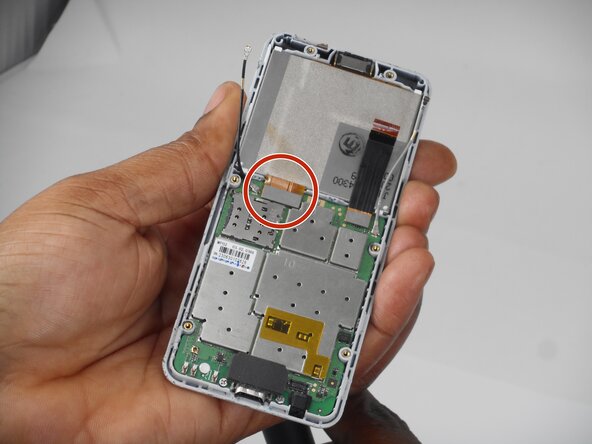
      • Use a spudger to lift and disconnect the screen press connector.

      • Make sure to pry up on the edge of the connector, not the board itself.

      • Remove the screen.

      Ask FixBot

      Add Comment

Conclusion

To reassemble your device, follow the above steps in reverse order.
Take your e-waste to an R2 or e-Stewards certified recycler.
Repair didn’t go as planned? Try some basic troubleshooting or ask our Answers community for help.

Cancel: I did not complete this guide.

2 Guide Comments

Hi Elias, do you know the the reference of the screen ?

Thanks

Baptiste

Baptiste Frattina - Reply Share

That's exactly what I'd like to know. Where do I get a screen for an MP02 that I can replace?

Jim - Reply Share

Add Comment

View Statistics:

Past 24 Hours: 3

Past 7 Days: 12

Past 30 Days: 81

All Time: 259