Free Shipping on Domestic Orders $75+

PowerBook 3400 M3553 Floppy Disk Drive Replacement

  1. PowerBook 3400 M3553 Floppy Disk Drive Replacement, Battery: step 1, image 1 of 1
    • Close the screen and turn the PowerBook over, orienting the computer upside down, using the label to guide you.

    Ask FixBot

    Add Comment

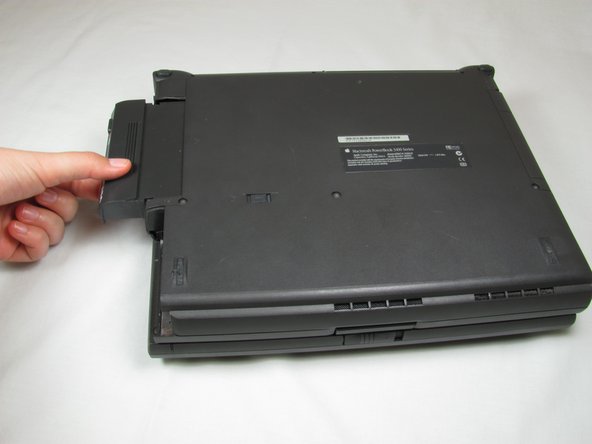
  2. PowerBook 3400 M3553 Floppy Disk Drive Replacement: step 2, image 1 of 2 PowerBook 3400 M3553 Floppy Disk Drive Replacement: step 2, image 2 of 2
    • Hold the button on the front left side and slide the battery out.

    Ask FixBot

    Add Comment

  3. PowerBook 3400 M3553 Floppy Disk Drive Replacement, Floppy Disk Drive: step 3, image 1 of 2 PowerBook 3400 M3553 Floppy Disk Drive Replacement, Floppy Disk Drive: step 3, image 2 of 2
    • First, slide the switch on the back of the computer to the left.

    • Then pull the floppy drive out of the computer.

    Ask FixBot

    Add Comment

Conclusion

To reassemble your device, follow these instructions in reverse order.

Cancel: I did not complete this guide.

One other person completed this guide.

Michael Mondragon

Member since: 04/12/11

397 Reputation

9 Guides authored

Team

Cal Poly, Team 24-59, Amido Spring 2011 Member of Cal Poly, Team 24-59, Amido Spring 2011

CPSU-AMIDO-S11S24G59

4 Members

9 Guides authored

0 Guide Comments

Add Comment

View Statistics:

Past 24 Hours: 0

Past 7 Days: 3

Past 30 Days: 20

All Time: 2,335