Free Shipping on Domestic Orders $75+

Power Mac G4 Quicksilver Video Adapter Replacement

What you need

  1. Power Mac G4 Quicksilver Video Adapter Replacement, Opening the case: step 1, image 1 of 1
    • The handle to open your computer is located on top of the right side panel.

    Ask FixBot

    Add Comment

  2. Power Mac G4 Quicksilver Video Adapter Replacement: step 2, image 1 of 2 Power Mac G4 Quicksilver Video Adapter Replacement: step 2, image 2 of 2
    • Grab the circular handle and pull outward.

    Ask FixBot

    Add Comment

  3. Power Mac G4 Quicksilver Video Adapter Replacement: step 3, image 1 of 1
    • Your computer is now open and ready for repair.

    Ask FixBot

    Add Comment

  4. Power Mac G4 Quicksilver Video Adapter Replacement, Video Adapter: step 4, image 1 of 1
    • This is your Power Mac G4's video adapter.

    Ask FixBot

    Add Comment

  5. Power Mac G4 Quicksilver Video Adapter Replacement: step 5, image 1 of 1
    • Start by removing the screw holding the card to the chassis as shown.

    Ask FixBot

    Add Comment

  6. Power Mac G4 Quicksilver Video Adapter Replacement: step 6, image 1 of 1
    • Before lifting the card out, this small plastic tab needs to be pulled back there by releasing it entirely.

    Ask FixBot

    Add Comment

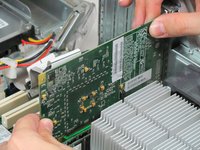
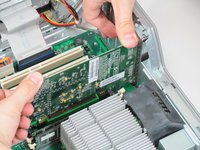
  7. Power Mac G4 Quicksilver Video Adapter Replacement: step 7, image 1 of 2 Power Mac G4 Quicksilver Video Adapter Replacement: step 7, image 2 of 2
    • With the tab and screw removed, lift the card straight out.

    • When putting the card back in, take care to apply even pressure across the top with your thumbs. This will avoid damaging the card.

    Ask FixBot

    Add Comment

  8. Power Mac G4 Quicksilver Video Adapter Replacement, Video Adapter: step 8, image 1 of 1
    • Your card is now completely removed and ready to be replaced.

    Ask FixBot

    Add Comment

Conclusion

To reassemble your device, follow these instructions in reverse order.

Cancel: I did not complete this guide.

5 other people completed this guide.

Cameron Christensen

Member since: 01/20/10

590 Reputation

3 Guides authored

Team

Cal Poly, Team 14-41, Regan Winter 2010 Member of Cal Poly, Team 14-41, Regan Winter 2010

CPSU-REGAN-W10S14G41

4 Members

27 Guides authored

0 Guide Comments

Add Comment

View Statistics:

Past 24 Hours: 2

Past 7 Days: 7

Past 30 Days: 45

All Time: 7,664