
Power Mac G4 Cube RAM Replacement

Ryan Chun and 7 other contributors
Last updated on Aug 12, 2014
Views: 6.8K
View statistics:
- Past 24 Hours:
- 5
- Past 7 Days:
- 21
- Past 30 Days:
- 108
- All Time:
- 6,778
Comments: 6
5 comments on steps, 1 guide comment.
Go to guide commentsCompleted: 11 12
11 people have marked this guide "completed." Will you be next?
12 people have marked this guide "completed." Including you — great job!
Favorites: 3 4
3 people have favorited (and subscribed to) this guide. Will you be next?
4 people have favorited (and subscribed to) this guide — including you!
Needs Better Images
Better photos will improve this guide. Help out by taking, editing, or uploading new ones!
Introduction
Go to step 1 ↓Installing RAM involves removing the outer case before installation.
What you need
Parts
Tools

-
-
-
Release the back handle of the PowerMac. Slowly pull out the cube by holding the end of the handle. Watch for any parts that may become entangled with the outer case.
-
Push back the handle after you have taken the core out of the case.
 Ask FixBot
-
-
-
Place the cube upside down and remove the four T10 Torx screws on the front plate. Then remove the two screws on each side.
-
-
-
-
-
-
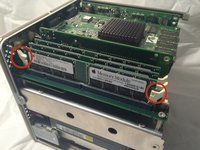
Flip the two latches on the side of the RAM chip.
-
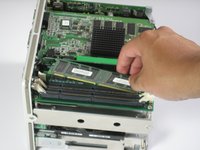
Remove the chip from the logic board and replace with new RAM.
-
-


To reassemble your device, follow these instructions in reverse order.
Cancel: I did not complete this guide.
11 other people completed this guide.

Team

Cal Poly, Team 2-7, Johann Summer 2010 Member of Cal Poly, Team 2-7, Johann Summer 2010
CPSU-JOHANN-R10S2G7
5 Members
84 Guides authored
1 Guide Comment
Unless you have really fat fingers, you shouldn’t need to remove the metal plate and pillars. I’m able to replace the RAM without those steps.
