Power Button Dead?

tcagle53 and one other contributor
Last updated on Dec 1, 2016
Views: 1.7K
View statistics:
- Past 24 Hours:
- 2
- Past 7 Days:
- 24
- Past 30 Days:
- 121
- All Time:
- 1,726
Comments: 0
No one has left comments on this guide. Will you be first?
Go to guide commentsCompleted: 1 2
1 person has marked this guide "completed." Will you be next?
2 people have marked this guide "completed." Including you — great job!
Favorites: 0 1
No one has favorited (and subscribed to) this guide. Will you be the first?
1 person has favorited (and subscribed to) this guide — and that's you!
Community-Contributed Guide
An awesome member of our community made this guide. It was not created by iFixit staff.
-
-
-
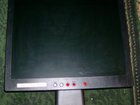
The power button becomes non-functional on my AL1912 Here is a quick fix to try if you have similar issues. May work on other similar Acer products as well (not sure though).
 Ask FixBot
-
-
-
I attribute these episodes to power dropouts or spikes or sunspots (not sure in other words). I fix it about once a year like this Press and Hold these three buttons on the lower control panel: > (right arrow) + Menu + Power When the power comes on you are done. These are the three buttons I've colored red in the photo.
-
-
-

Cancel: I did not complete this guide.
One other person completed this guide.


