Free Shipping on Domestic Orders $75+

Polk Omni S2 Front Cover Replacement

What you need

  1. Polk Omni S2 Front Cover Replacement, Front Cover: step 1, image 1 of 1
    • Pry off the grille by pulling on the top middle part of it.

    • Remove the grille carefully, but note that it takes a large amount of force to remove. If it seems like you're bending the grille too much, try pulling on it from the bottom instead.

  2. Polk Omni S2 Front Cover Replacement: step 2, image 1 of 3 Polk Omni S2 Front Cover Replacement: step 2, image 2 of 3 Polk Omni S2 Front Cover Replacement: step 2, image 3 of 3
    • Remove the eight 12 mm screws securing the front cover using a Phillips #1 screwdriver.

    • Like the grille, pull from the top middle of the gray cover and slowly remove it from the speaker, like separating a sub roll.

    • Be careful of the wires between the cover and the motherboard. If you pull the cover apart too far, you might damage these wires.

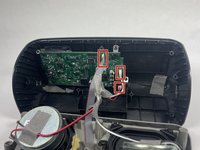
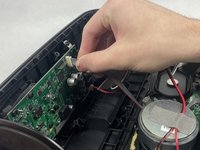
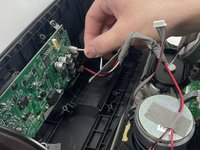
  3. Polk Omni S2 Front Cover Replacement: step 3, image 1 of 3 Polk Omni S2 Front Cover Replacement: step 3, image 2 of 3 Polk Omni S2 Front Cover Replacement: step 3, image 3 of 3
    • Remove the two square cotton pieces.

    • Unplug these three wires plugged into the motherboard by gently pulling and wiggling the wires until they're unplugged. Grip the wires close to the end to avoid damaging them.

Conclusion

To reassemble your device, follow these instructions in reverse order.

Phoenix Dalla Costa

Member since: 10/18/24

277 Reputation

3 Guides authored

Team

UMass Dartmouth, Team 1-4, Konn Fall 2024 Member of UMass Dartmouth, Team 1-4, Konn Fall 2024

UMASSD-KONN-F24S1G4

4 Members

7 Guides authored

0 Guide Comments

Add Comment

View Statistics:

Past 24 Hours: 0

Past 7 Days: 6

Past 30 Days: 18

All Time: 212