Free Shipping on Domestic Orders $75+

Polaroid S7 Battery Replacement

What you need

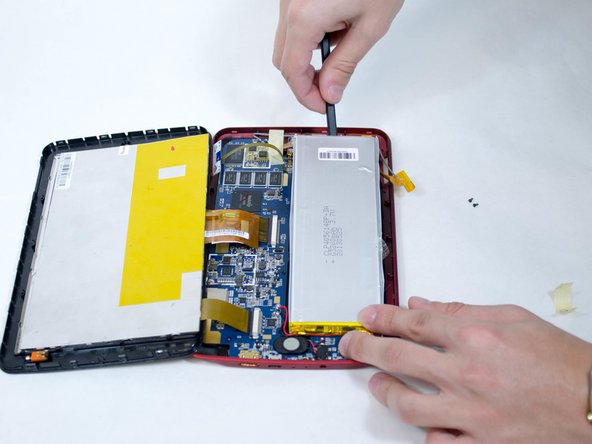
  1. Polaroid S7 Battery Replacement, Remove the back: step 1, image 1 of 2 Polaroid S7 Battery Replacement, Remove the back: step 1, image 2 of 2
    • Insert the flat end of a soft plastic opening tool between the screen and the back cover.

    • Pry the two pieces apart.

    • Take care not to rip the ribbons that connect the screen to the back cover.

    Ask FixBot

    Add Comment

  2. Polaroid S7 Battery Replacement: step 2, image 1 of 1
    • Use a metal spudger to remove the orange sticker.

    Ask FixBot

    Add Comment

  3. Polaroid S7 Battery Replacement: step 3, image 1 of 1
    • Use the screwdriver to remove the 2 x 4 mm Phillips #00 head screws from the blue board located on the lower-right corner of the battery.

    Ask FixBot

    Add Comment

  4. Polaroid S7 Battery Replacement: step 4, image 1 of 2 Polaroid S7 Battery Replacement: step 4, image 2 of 2
    • Use the metal spudger to remove the three pieces of clear tape adhering from the battery to the blue board.

    • Pry the battery up from the right side.

    Ask FixBot

    Add Comment

  5. Polaroid S7 Battery Replacement: step 5, image 1 of 1
    • Remove the yellow plastic that covers the battery connector.

    Ask FixBot

    Add Comment

  6. Polaroid S7 Battery Replacement: step 6, image 1 of 1
    • Use a soldering iron to remove the wires connected to the battery.

    Ask FixBot

    Add Comment

Conclusion

To reassemble your device, follow these instructions in reverse order.

Cancel: I did not complete this guide.

One other person completed this guide.

Anthony Larratt

Member since: 01/20/15

281 Reputation

1 Guide authored

Team

USF Tampa, Team 1-2, Blackwell Winter 2015 Member of USF Tampa, Team 1-2, Blackwell Winter 2015

USFT-BLACKWELL-W15S1G2

4 Members

6 Guides authored

0 Guide Comments

Add Comment

View Statistics:

Past 24 Hours: 0

Past 7 Days: 4

Past 30 Days: 32

All Time: 3,512