Free Shipping on Domestic Orders $75+

Polaroid S10 Speaker Replacement

What you need

    1. Polaroid S10 Speaker Replacement, Removing the backcover: step 1, image 1 of 3 Polaroid S10 Speaker Replacement, Removing the backcover: step 1, image 2 of 3 Polaroid S10 Speaker Replacement, Removing the backcover: step 1, image 3 of 3
      • Place an opening pick between the volume button and the back cover.

      • More than one pick may be needed, but avoid placing more than two picks in the same space.

      • Excessive force on the pick will break the volume button.

      • Carefully remove the back cover using the metal spudger.

      • It is normal to hear a snapping noise due to the plastic tabs on the back cover.

      Ask FixBot

      Add Comment

    1. Polaroid S10 Speaker Replacement, Speaker Assembly: step 2, image 1 of 2 Polaroid S10 Speaker Replacement, Speaker Assembly: step 2, image 2 of 2
      • Use a heavy-duty nylon spudger to remove the tape.

      • Unscrew the four 5 mm screws with the J000 screwdriver that connects the speakers.

      Ask FixBot

      Add Comment

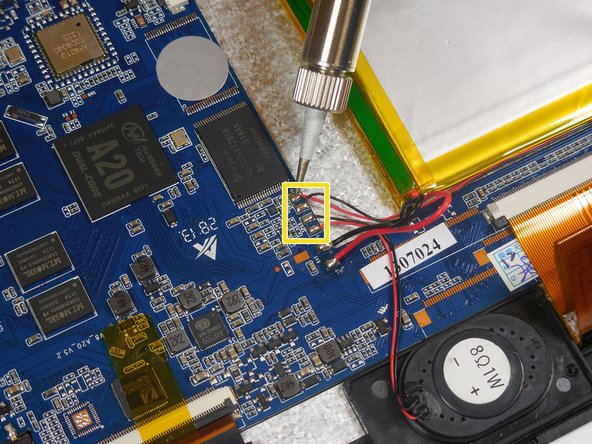
    1. Polaroid S10 Speaker Replacement, Desoldering the Speakers: step 3, image 1 of 2 Polaroid S10 Speaker Replacement, Desoldering the Speakers: step 3, image 2 of 2
      • Carefully desolder the 4 connections of the speakers.

      • Do not touch the soldering iron to the motherboard or LCD screen.

      Ask FixBot

      Add Comment

Conclusion

To reassemble your device, follow these instructions in reverse order.

Cancel: I did not complete this guide.

James

Member since: 03/16/15

367 Reputation

3 Guides authored

Team

0 Guide Comments

Add Comment

View Statistics:

Past 24 Hours: 2

Past 7 Days: 7

Past 30 Days: 22

All Time: 640