
Polaroid Cube Battery Replacement

heath lamkin and 3 other contributors
Last updated on Dec 22, 2016
Views: 11K
View statistics:
- Past 24 Hours:
- 4
- Past 7 Days:
- 24
- Past 30 Days:
- 130
- All Time:
- 11,182
Comments: 13
13 guide comments.
Go to guide commentsCompleted: 10 11
10 people have marked this guide "completed." Will you be next?
11 people have marked this guide "completed." Including you — great job!
Favorites: 0 1
No one has favorited (and subscribed to) this guide. Will you be the first?
1 person has favorited (and subscribed to) this guide — and that's you!
Introduction
Go to step 1 ↓This guide will walk you through the steps of replacing the battery on your Polaroid Cube. Make sure the device is completely powered off before disassembly, and that you have all of the required tools.
What you need
Tools


-
-
-
Using a J00 head screwdriver, remove the four 3.27mm screws from the front of the camera near the lens.
-
-
-
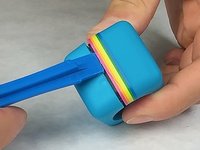
Use the Plastic Opening Tool to pry open the shell of the camera.
-
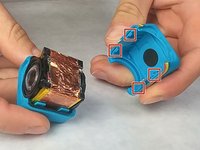
There are four latches, one at each corner, that you will need to detach.
-
-
-
-
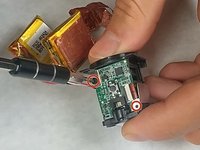
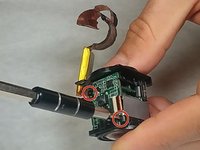
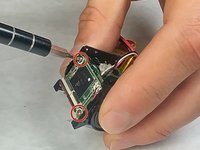
Using a J00 head screwdriver, unscrew the four 3.46mm screws from the top and bottom circuit board.
-
-
-
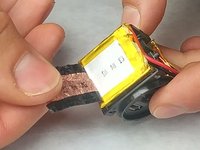
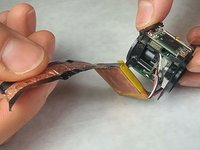
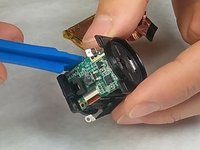
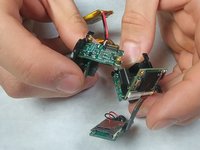
Use the plastic opening tool to remove the circuit board that the battery is connected to.
-

 Ask FixBot









To reassemble your device, follow these instructions in reverse order.
Cancel: I did not complete this guide.
10 other people completed this guide.

Team

IUPUI, Team 3-2, Harley Fall 2016 Member of IUPUI, Team 3-2, Harley Fall 2016
IUPUI-HARLEY-F16S3G2
4 Members
36 Guides authored
13 Guide Comments
Any idea where to find the replacement batteries?
the cube requires a two-pack battery which has a single plug for both of them and so they have to be wired together in just the right way to be able to fit inside the cube. i guess it's not possible to buy replacement batt. and paying minimum $16 for it? u could just buy a new one for too close to $16. or a used one.
