Introduction
Polar Wind 8" High Velocity portable fans are cheap, yet efficient, and easy to carry around. While these fans can last many years with proper care, the blades are made of plastic, and can easily get damaged or worn. This guide will show you how to replace the blades in six steps, and all you need is the knowledge of how to properly use a screwdriver and a pair of pliers.
Because we are dealing with small parts that can be rather tricky to disassemble, the difficulty of this guide is set to moderate.
Tips:
- Lube would be helpful to have on hand, but is not required.
- Because the blades are made of plastic, it would be a good idea to recycle the old blades.
What you need
-
-
-
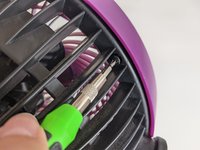
Use a Y000 tri-point screwdriver to remove four screws from the backside of your the fan, turning counterclockwise.
 Ask FixBot
-
-
-
-
Use a Y000 tri-point screwdriver to remove the two screws from under the fan blades, turning counterclockwise.
-
-
-
Carefully remove the fan blades by holding the base and lifting it up out of the motor.
-
-
-
Firmly grasp the base of the blades, pushing it down and turning clockwise to slide down to the base of the rod.
-
Use a pair of pliers to remove the center disk by pinching the rim and pulling upwards.
-
Once it is loosened, squeeze the bottom of the disk and the tip of the rod between your pliers to more easily remove the disk.
-
-
-
Once removed, set the center disk aside.
-
Firmly grasp the base of the fan blades, pulling upwards and turning counterclockwise.
-
Set old blades aside to be recycled later, and replace with the new blades.
-
-




To reassemble your device, follow these instructions in reverse order.
Cancel: I did not complete this guide.
One other person completed this guide.

Team

Grand Valley State University, Team S1-G7, DeVasto Winter 2021 Member of Grand Valley State University, Team S1-G7, DeVasto Winter 2021
GVSU-DEVASTO-W21S1G7
1 Member
10 Guides authored
