
Polar M400 Watch Screen Replacement

Nicholas Sanders and 2 other contributors
Last updated on Jan 2, 2018
Views: 11K
View statistics:
- Past 24 Hours:
- 3
- Past 7 Days:
- 24
- Past 30 Days:
- 118
- All Time:
- 10,936
Comments: 22
12 comments on steps, 10 guide comments.
Go to guide commentsCompleted: 6 7
6 people have marked this guide "completed." Will you be next?
7 people have marked this guide "completed." Including you — great job!
Favorites: 0 1
No one has favorited (and subscribed to) this guide. Will you be the first?
1 person has favorited (and subscribed to) this guide — and that's you!
Better Introduction
Improve this guide by completing or revising its introduction.
What you need
Parts
Tools


-
-
-
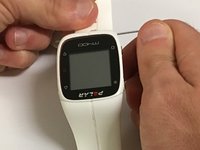
Insert a standard paper clip into the holes on both sides of the watch that connect the watch's face with the wrist strap.
 Ask FixBot
-
-
Tool used on this step:Tweezers$4.99
-
Apply an upward pressure to the holes until the locking pins release.
-
Use precision tweezers to remove the pins that connect the face with the strap.
-
-
-
-
-
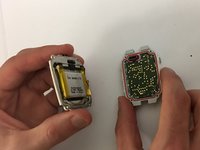
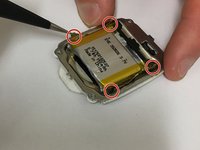
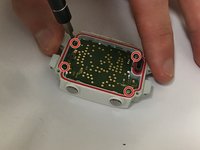
Use the T5 head on the iFixit screwdriver to unscrew the four screws on the back of the watch’s face.
-
-
Tool used on this step:Tweezers$4.99
-
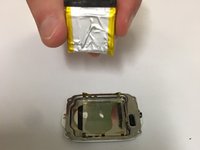
Use tweezers to gently pry the golden sensor away from the battery.
-
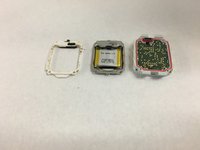
Remove battery using the plastic opening tools.
-
-
-
-
-
-
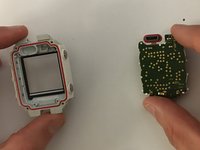
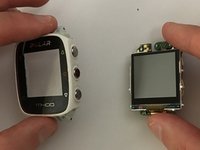
Detach the screen from the screen protector using a PH000 screwdriver.
-
-
-
Make sure that the charging port remains accessible, as it can easily become detached during the replacement.
-
-










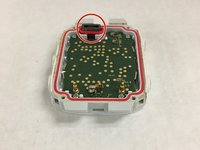
To reassemble your device, follow these instructions in reverse order.
Cancel: I did not complete this guide.
6 other people completed this guide.

Team

University of Maine, Team S1-G3, Diaz Fall 2017 Member of University of Maine, Team S1-G3, Diaz Fall 2017
UMAINE-DIAZ-F17S1G3
4 Members
36 Guides authored
10 Guide Comments
Hi, where can i buy the replacement?
Thanks
hi,where can I buy the usb replacement.
Hi, were can i buy the replacement. Thanks
I bought a connector USB there… Maybe can be interesting for someone else…
hello manuel,
i tried to order from the web site you specified, but it looks like they are not delivering in france,
cna you please tell me where else i can order this peice
