Free Shipping on Domestic Orders $75+

PlayStation Vita Wireless Card Replacement

What you need

  1. PlayStation Vita Wireless Card Replacement, Case Separation: step 1, image 1 of 2 PlayStation Vita Wireless Card Replacement, Case Separation: step 1, image 2 of 2
    • Power off and remove the memory card.

    • Using a Phillips #00 screwdriver, remove the four 6.4mm screws on the back casing.

    Ask FixBot

    Add Comment

  2. PlayStation Vita Wireless Card Replacement: step 2, image 1 of 3 PlayStation Vita Wireless Card Replacement: step 2, image 2 of 3 PlayStation Vita Wireless Card Replacement: step 2, image 3 of 3
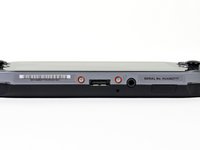
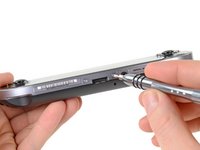
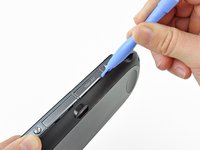
    • Using your fingernail or a spudger, pry open the accessory port cover on the top of the device.

    • Using a Phillips #00 screwdriver, remove the two 5.4mm screws hidden beneath the accessory port cover.

    Ask FixBot

    Add Comment

  3. PlayStation Vita Wireless Card Replacement: step 3, image 1 of 2 PlayStation Vita Wireless Card Replacement: step 3, image 2 of 2
    • Remove the two 5.4mm Phillips #00 screws on the bottom of the device near the charging port.

    Ask FixBot

    Add Comment

  4. PlayStation Vita Wireless Card Replacement: step 4, image 1 of 3 PlayStation Vita Wireless Card Replacement: step 4, image 2 of 3 PlayStation Vita Wireless Card Replacement: step 4, image 3 of 3
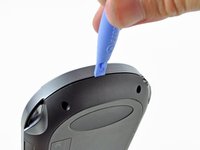
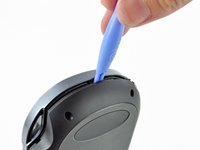
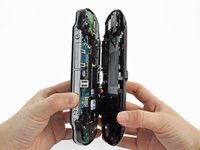
    • Beginning at the sides of the device, use a plastic opening tool to separate the front and rear cases.

    • Continue working your way around the device gently prying it open.

    • There are still wires holding the front and rear cases together. You may damage the connections if you yank the cases completely apart.

    Ask FixBot

    Add Comment

  5. PlayStation Vita Wireless Card Replacement: step 5, image 1 of 2 PlayStation Vita Wireless Card Replacement: step 5, image 2 of 2
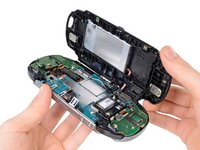
    • Gently separate the two cases, minding the battery and the touch screen controller connectors holding the two cases together.

    Ask FixBot

    Add Comment

  6. PlayStation Vita Wireless Card Replacement: step 6, image 1 of 1
    • Using a spudger, free the touch screen controller flex cable by gently prying up the connection.

    Ask FixBot

    Add Comment

  7. PlayStation Vita Wireless Card Replacement: step 7, image 1 of 1
    • Free the battery cable by gently prying up on the connection with a spudger.

    Ask FixBot

    Add Comment

  8. PlayStation Vita Wireless Card Replacement: step 8, image 1 of 1
    • Separate the front and rear cases.

    Ask FixBot

    Add Comment

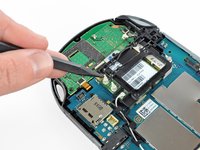
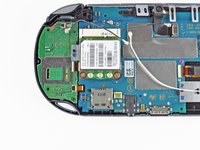
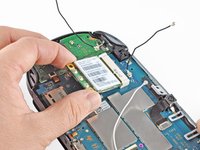
  9. PlayStation Vita Wireless Card Replacement, Wireless Card: step 9, image 1 of 3 PlayStation Vita Wireless Card Replacement, Wireless Card: step 9, image 2 of 3 PlayStation Vita Wireless Card Replacement, Wireless Card: step 9, image 3 of 3
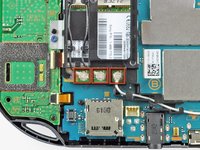
    • Using the pointy end of the spudger, disconnect the three antenna cable connectors on top of the wireless card.

    • Deroute the antenna cables so that they are out of the wireless card casing. Rest the wires out of the way.

    Ask FixBot

    Add Comment

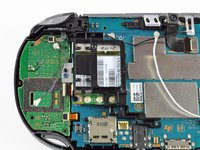
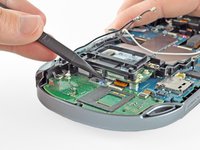
  10. PlayStation Vita Wireless Card Replacement: step 10, image 1 of 2 PlayStation Vita Wireless Card Replacement: step 10, image 2 of 2
    • Hook the spudger beneath the tab on the wireless card casing and release the tab.

    • Peel up and remove the wireless card casing.

    Ask FixBot

    Add Comment

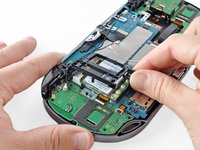
  11. PlayStation Vita Wireless Card Replacement: step 11, image 1 of 2 PlayStation Vita Wireless Card Replacement: step 11, image 2 of 2
    • Remove the two 4.4mm Phillips #00 screws on the wireless card.

    • The wireless card will naturally pop out at an angle.

    • Pull out the wireless card.

    Ask FixBot

    Add Comment

Conclusion

To reassemble your device, follow these instructions in reverse order.

Cancel: I did not complete this guide.

3 other people completed this guide.

Brittany McCrigler

Member since: 03/05/12

90,933 Reputation

142 Guides authored

Team

iFixit Member of iFixit

Staff

122 Members

26,597 Guides authored

5 Guide Comments

i am takig my vita apart (moving all boards/chips into new oled lcd screen/ front part) and am having trouble taking the wifi chip out in order to take out the right button board, the screw closest to the right button board is i think stripped, is there an easy and non harming way to the motherboard of taking that screw out?

Saul Calderon - Reply Share

Rubber band .

Duck - Reply Share

umm, just took mine apart and there isnt a card nor a card holder.... what?

Joe The total Lord - Reply Share

Then you have the Wi-Fi only version. Only the model with the 3G modem actually has that slot. This part is the 3G modem module. The actual Wi-Fi chip is on the mainboard not as a separate module.

ccfman2004 - Reply Share

Ask if I got this card and I can build a console without that module. Ask if I got this card and I put together a console without that wifi module, can the console work?

Fernando Olivares - Reply Share

Add Comment

View Statistics:

Past 24 Hours: 7

Past 7 Days: 43

Past 30 Days: 222

All Time: 18,200