Free Shipping on Domestic Orders $75+

PlayStation Classic Controller Cord Replacement

Views: 8.5K

View statistics:

Past 24 Hours:
4
Past 7 Days:
19
Past 30 Days:
95
All Time:
8,515
Comments: 2

2 guide comments.

Go to guide comments
Completed: 3

3 people have marked this guide "completed." Will you be next?

Favorites: 0

No one has favorited (and subscribed to) this guide. Will you be the first?

Time Required: 15 minutes
Difficulty: Easy
PlayStation Classic Controller Cord Replacement

Introduction

Go to step 1 ↓

This guide will demonstrate how to replace the controller cord for a PlayStation Classic Controller. You should only need a Phillips #0 Screwdriver and optionally the Jimmy tool.

What you need

Parts

Tools

    1. PlayStation Classic Controller Cord Replacement, Controller Cord: step 1, image 1 of 3 PlayStation Classic Controller Cord Replacement, Controller Cord: step 1, image 2 of 3 PlayStation Classic Controller Cord Replacement, Controller Cord: step 1, image 3 of 3
      • Turn the controller over so that the screws are facing up.

      Ask FixBot

      Add Comment

    2. PlayStation Classic Controller Cord Replacement: step 2, image 1 of 1
      • Use a small Phillips #0 screwdriver to remove the eight Xmm screws.

      • Make sure to store the screws in a safe place so they are not lost before reassembly.

      Ask FixBot

      Add Comment

    3. PlayStation Classic Controller Cord Replacement: step 3, image 1 of 3 PlayStation Classic Controller Cord Replacement: step 3, image 2 of 3 PlayStation Classic Controller Cord Replacement: step 3, image 3 of 3
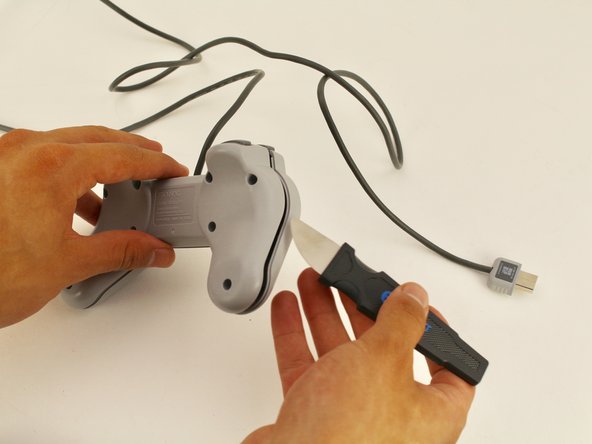
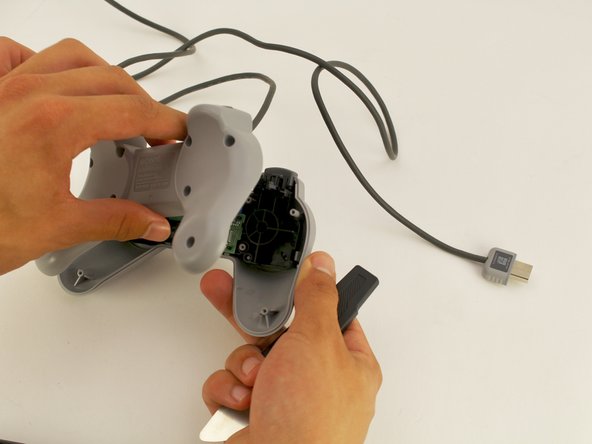
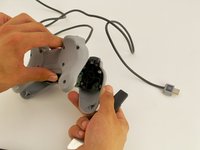
      • Use the Jimmy tool to take the back part off and get into the controller.

      • It shouldn’t take much force to remove the back part. Make sure all screws are taken out beforehand so you avoid hurting yourself or damaging the controller.

      Ask FixBot

      Add Comment

    4. PlayStation Classic Controller Cord Replacement: step 4, image 1 of 1
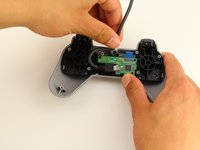
      • You will notice that the controller cord is plugged into a Micro USB port on the controller motherboard.

      Ask FixBot

      Add Comment

    5. PlayStation Classic Controller Cord Replacement: step 5, image 1 of 3 PlayStation Classic Controller Cord Replacement: step 5, image 2 of 3 PlayStation Classic Controller Cord Replacement: step 5, image 3 of 3
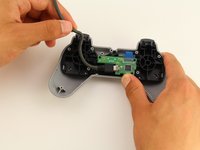
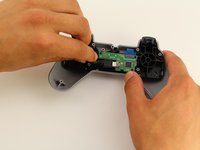
      • To unplug the cord from the controller motherboard, carefully take the cord out from between the small pegs that it is nestled into.

      • When unplugging the cord, hold the controller so that no significant pressure is applied to the motherboard that will damage it.

      Ask FixBot

      Add Comment

Conclusion

To reassemble your device, follow these instructions in reverse order.

Cancel: I did not complete this guide.

3 other people completed this guide.

Maxwell Webb

Member since: 04/22/19

709 Reputation

5 Guides authored

Team

Cal Poly, Team S2-G8, Maness Spring 2019 Member of Cal Poly, Team S2-G8, Maness Spring 2019

CPSU-MANESS-S19S2G8

2 Members

60 Guides authored

2 Guide Comments

Will this fix the controller being unresponsive?

Jamal Saeed - Reply Share

maybe but It depends

Nicebug444 - Reply Share

Add Comment

View Statistics:

Past 24 Hours: 4

Past 7 Days: 19

Past 30 Days: 95

All Time: 8,515