Free Shipping on Domestic Orders $75+

PlayStation 4 Pro Power Supply Unit Replacement

What you need

    1. PlayStation 4 Pro Power Supply Unit Replacement, Power Supply Unit: step 1, image 1 of 3 PlayStation 4 Pro Power Supply Unit Replacement, Power Supply Unit: step 1, image 2 of 3 PlayStation 4 Pro Power Supply Unit Replacement, Power Supply Unit: step 1, image 3 of 3
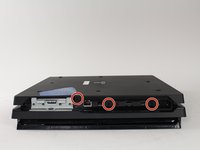
      • Begin by flipping the console upside down.

      • Use your finger to pull and snap off the plastic cover over the hard drive.

      Ask FixBot

      Add Comment

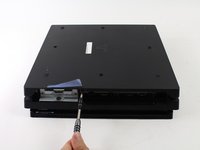
    2. PlayStation 4 Pro Power Supply Unit Replacement: step 2, image 1 of 2 PlayStation 4 Pro Power Supply Unit Replacement: step 2, image 2 of 2
      • Use a screwdriver to remove the single Phillips #0 screw securing the hard drive caddy.

      • Pull the hard drive caddy straight out.

      Ask FixBot

      Add Comment

    3. PlayStation 4 Pro Power Supply Unit Replacement: step 3, image 1 of 3 PlayStation 4 Pro Power Supply Unit Replacement: step 3, image 2 of 3 PlayStation 4 Pro Power Supply Unit Replacement: step 3, image 3 of 3
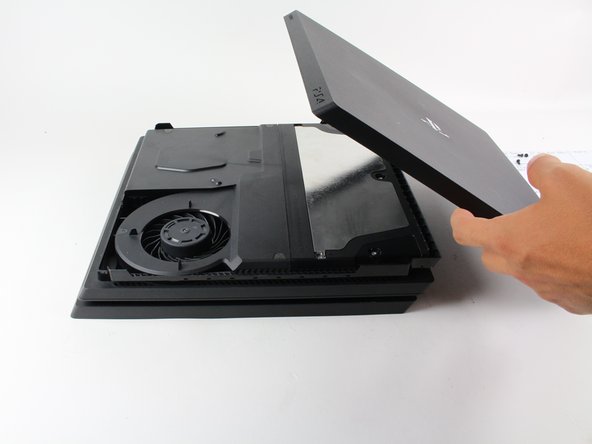
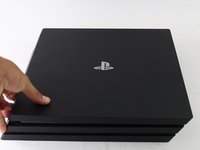
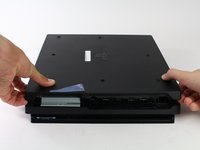
      • Flip the console right side up.

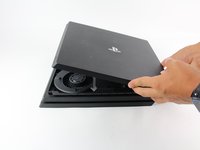
      • Grip the two corners located at the front of the device.

      • Pull upwards until a loud click is heard.

      • This may require a lot of force, so do not be afraid to get a little rough with your console.

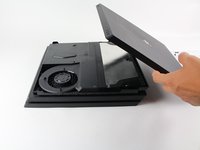
      • After both corners detach, slide the cover backwards and lift off.

      Ask FixBot

      Add Comment

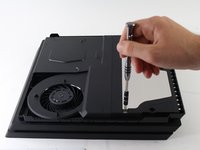
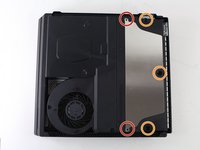
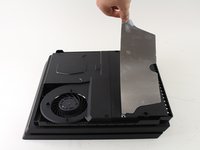
    4. PlayStation 4 Pro Power Supply Unit Replacement: step 4, image 1 of 3 PlayStation 4 Pro Power Supply Unit Replacement: step 4, image 2 of 3 PlayStation 4 Pro Power Supply Unit Replacement: step 4, image 3 of 3
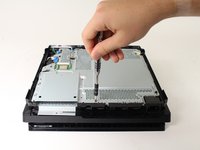
      • Use a T8 Torx Security screwdriver to remove the five screws.

      • Two 31mm screws.

      • Three 10mm screws.

      • Remove the metal plate.

      Ask FixBot

      Add Comment

    5. PlayStation 4 Pro Power Supply Unit Replacement: step 5, image 1 of 3 PlayStation 4 Pro Power Supply Unit Replacement: step 5, image 2 of 3 PlayStation 4 Pro Power Supply Unit Replacement: step 5, image 3 of 3
      • Flip the console to its back once again.

      • Use a T8 Torx Security screwdriver to remove the three black 7mm screws in the back panel.

      • Remove the bottom cover in the same way as the top cover. Grip on both sides, pull up until a click is heard and slide off.

      Ask FixBot

      Add Comment

    6. PlayStation 4 Pro Power Supply Unit Replacement: step 6, image 1 of 2 PlayStation 4 Pro Power Supply Unit Replacement: step 6, image 2 of 2
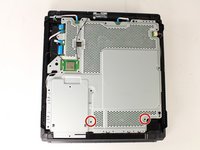
      • Use a T8 Torx security screwdriver to remove the two 10mm silver screws from the metal plate.

      Ask FixBot

      Add Comment

    7. PlayStation 4 Pro Power Supply Unit Replacement: step 7, image 1 of 3 PlayStation 4 Pro Power Supply Unit Replacement: step 7, image 2 of 3 PlayStation 4 Pro Power Supply Unit Replacement: step 7, image 3 of 3
      • Flip the console over to continue working on the top side.

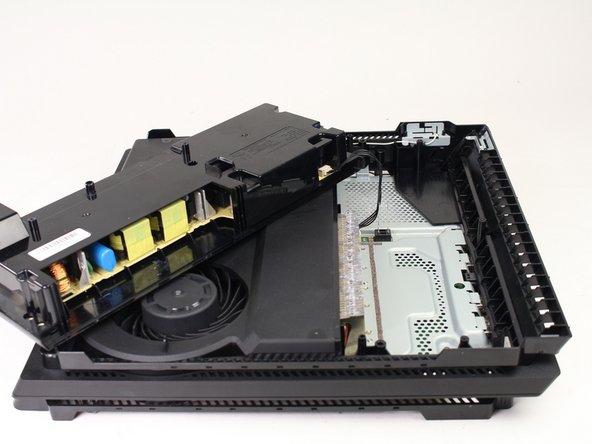
      • Place fingers underneath edge of power supply unit on both sides and pull straight up.

      • Be careful not to pull too far, the assembly is still connected at one point.

      • Grip the connector behind the power supply and pull straight out.

      Ask FixBot

      Add Comment

Conclusion

To reassemble your device, follow these instructions in reverse order.

Cancel: I did not complete this guide.

47 other people completed this guide.

Ashlyn Chow

Member since: 04/25/17

4,084 Reputation

1 Guide authored

Team

Cal Poly, Team S21-G5, Livingston Spring 2017 Member of Cal Poly, Team S21-G5, Livingston Spring 2017

CPSU-LIVINGSTON-S17S21G5

4 Members

84 Guides authored

10 Guide Comments

Thank you soooo much for helping me save my ps4 pro guys! At the moment I love you like no one before! ;D

Fayce D D - Reply Share

Can you go further in your tear-down and show us how to open up the power supply without breaking the PSU plastic case? Thanks. ^_^

Matt - Reply Share

I bought a PS4 power supply CR 300 and my PS4 has an FR 300 power supply will they interchange

joseph fish - Reply Share

My PlayStation Pro has a power supply FR 300 and the power supply I bought was a CR 300 power supply will they interchange

joseph fish - Reply Share

Hola como saber que tipo de fuente vida mi ps4 pro modelo 7215b

Tomás Javier - Reply Share

Add Comment

View Statistics:

Past 24 Hours: 22

Past 7 Days: 190

Past 30 Days: 851

All Time: 114,189