Introduction
Use this guide to replace the control board. Replacing the control board will provide a new mirror panel, power button, and eject button.
What you need
-
-
-
Turn the PS3 over and lay it on its backside.
-
Carefully peel the warranty sticker up off the lower case to reveal a hidden screw cover.
 Ask FixBot
-
-
-
Use the flat end of a metal spudger to pry up the seven screw covers around the edge of the lower case.
-
-
-
-
Remove the seven 37 mm Phillips screws securing the top cover to the lower case.
-
-
-
Remove the four 13.3 mm T8 security Torx screws beneath the Blu-ray drive opening. (Some models may only have three screws)
-
-
-
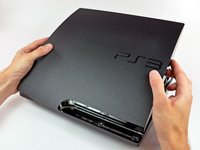
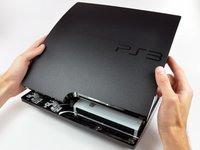
Lift the top cover from its rear edge and rotate it toward the front of the PS3.
-
Lift the top cover off the PS3.
-
-
-
-
-
Use the tip of a spudger to pry the control board out of its housing within the lower case.
-
Pull the control board ribbon cable away from its socket on the control board.
-
-




To reassemble your device, follow these instructions in reverse order.
Cancel: I did not complete this guide.
27 other people completed this guide.

2 Guide Comments
I have a PS3 slim that won't turn on, unfortunately my Power/eject button and ribbon cable are completely removed from my PS3. Can I turn it on without the button/ribbon cable?
I replaced the entire psu but without a standby light I have no idea if I'm close to powering it on. I suppose I could get a multimeter but I don't know what I'm testing. Any info would be appreciated.
