Introduction
Use this guide to replace your PlayStation 3 Slim's Bluetooth and Wi-Fi antennas.
What you need
-
-
-
Turn the PS3 over and lay it on its backside.
-
Carefully peel the warranty sticker up off the lower case to reveal a hidden screw cover.
 Ask FixBot
-
-
-
Use the flat end of a metal spudger to pry up the seven screw covers around the edge of the lower case.
-
-
-
Remove the seven 37 mm Phillips screws securing the top cover to the lower case.
-
-
-
Remove the four 13.3 mm T8 security Torx screws beneath the Blu-ray drive opening. (Some models may only have three screws)
-
-
-
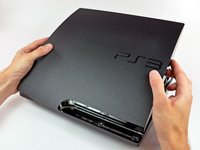
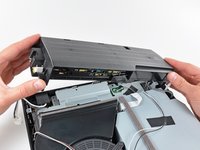
Lift the top cover from its rear edge and rotate it toward the front of the PS3.
-
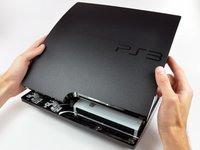
Lift the top cover off the PS3.
-
-
-
-
-
-
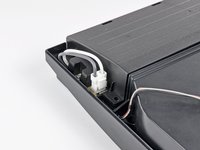
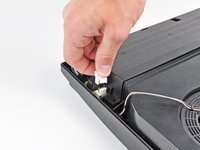
Squeeze the AC inlet connector's locking mechanism and pull straight up to disconnect it from the power supply.
-
-
-
Pull the DC-Out cables straight up to lift their connector up and out of its socket on the power supply.
-
-
-
Remove the two 7.6 mm Phillips screws securing the power supply to the lower case.
-
-
-
Lift the power supply upward from its left edge as viewed from the front of the PS3.
-
-
-
Continue to lift the left edge of the power supply until it lifts off the two metal posts shown in the second picture.
-
Remove the power supply from the PS3, minding any cables that may get caught.
-
-
-
-
-
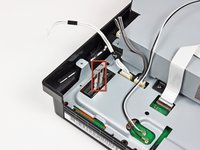
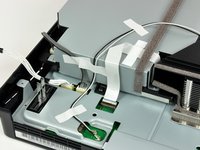
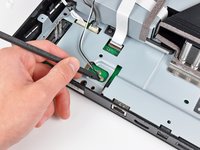
If present, remove the pieces of tape securing the antenna cables to the fan shroud, Blu-ray drive, and top shield.
-
-
-
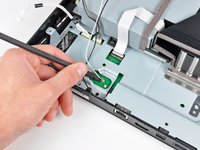
Remove the two 6.2 mm Phillips screws securing the antennas to the lower case.
-
-
-
Use the flat end of a spudger to pry both antenna connectors up off their sockets on the motherboard.
-
-
-
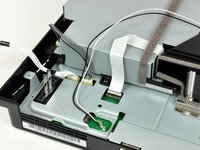
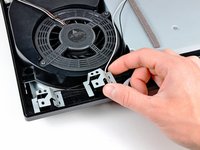
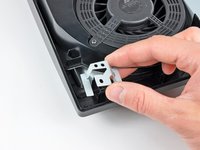
Lift the antennas off their plastic positioning posts and remove them from the lower case, minding their cables that may get caught.
-
-












To reassemble your device, follow these instructions in reverse order.
Cancel: I did not complete this guide.
22 other people completed this guide.

6 Guide Comments
Do you guys have parts for PlayStation 3 Slim Antennas I want to now I can buy some from you guys
Which color is the wifi and which is the bluetooth? I haven’t tested the wifi on the system yet, but the controllers are not connecting so I think I have to replace just the bluetooth part.
A year or so ago I noticed my controller wasn't working unless plugged in. I thought it might just be failed battery over the years, but it worked when plugged in, so it was only a minor inconvenience. Later, I realized WiFi wasn't working either, so I thought maybe an update would fix things… plugged into wired network to update system.
DO NOT UPDATE YOUR SYSTEM IF EXPERIENCING WIFI OR BLUETOOTH CONNECTIVITY ISSUES!
Now stuck in a boot loop where the update tries and fails to install. I can't get back into my system to backup and transfer my data, so I'm stuck looking for a solution to either fix my system or transfer to a replacement, but even for an estimated repair cost of $120, Sony support said their first attempted fix action will be to factory reset the system.
Anybody have any advice?
Sony, why would you allow a firmware update to begin install without first running a basic hardware check? Then, why wouldn't you allow some recovery option for a failed update?
Guess I've learned to always backup my stuff.
