Free Shipping on Domestic Orders $75+

PlayStation 2 Disc Tray Belt Replacement

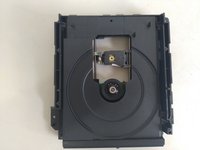
  1. PlayStation 2 Disc Tray Belt Replacement, Remove the disk dirver: step 1, image 1 of 2 PlayStation 2 Disc Tray Belt Replacement, Remove the disk dirver: step 1, image 2 of 2
    • Open the console case and remove the disk driver.

    • Be careful with the flat cables and its connectors.

    Ask FixBot

    Add Comment

  2. PlayStation 2 Disc Tray Belt Replacement, Remove the protection: step 2, image 1 of 3 PlayStation 2 Disc Tray Belt Replacement, Remove the protection: step 2, image 2 of 3 PlayStation 2 Disc Tray Belt Replacement, Remove the protection: step 2, image 3 of 3
    • Remove the disk tray and remove the gear plastic conver protection.

    • You dont need to remove any gear form its place.

    • Remove the old belt and replace with a new one.

    • The belt must be a PS2 fat compatible belt. If you don't have a PS2 you can use a radio K7 driver belt but it need to have the same diameter of the PS2 belt.

    • Old and lax belt.

    • Brand new belt.

    Ask FixBot

    Add Comment

  3. PlayStation 2 Disc Tray Belt Replacement, Clean the lens: step 3, image 1 of 1
    • Don't loose the opportunity and clean the laser lens with a cotton swab.

    Ask FixBot

    Add Comment

Finish Line

Cancel: I did not complete this guide.

9 other people completed this guide.

Vinicius Rodrigues Bellini

Member since: 12/12/22

1,185 Reputation

6 Guides authored

4 Guide Comments

Anyone has the measurements of this belt? What’s the thickness and what’s the diameter or circumference?

Joel - Reply Share

I head 40mm diameter and 1,2mm thickness should fit fine.

Markus Ro - Reply Share

Anyone has the dimensions of this belt?

What’s the circumference/radius? What’s the thickness?

Joel - Reply Share

Sd okuyucu calısmıyor

alpercelal çam - Reply Share

Add Comment

View Statistics:

Past 24 Hours: 30

Past 7 Days: 158

Past 30 Days: 756

All Time: 16,048