
Photive Hydra Battery Replacement

Matthew Knight and 3 other contributors
Last updated on May 23, 2016
Views: 940
View statistics:
- Past 24 Hours:
- 1
- Past 7 Days:
- 19
- Past 30 Days:
- 84
- All Time:
- 940
Comments: 1
1 guide comment.
Go to guide commentsCompleted: 1 2
1 person has marked this guide "completed." Will you be next?
2 people have marked this guide "completed." Including you — great job!
Favorites: 0 1
No one has favorited (and subscribed to) this guide. Will you be the first?
1 person has favorited (and subscribed to) this guide — and that's you!
Mismatched Prerequisites
This guide does not have a proper prerequisite guide. Help match it to its ideal partner by finding it or writing one!
Slice and Dice
The steps in this guide should be split up and made into a series of prerequisite guides.
Step Trimmer
This guide has unnecessary steps. Trim them to be more concise!
Introduction
Go to step 1 ↓If the battery for your Photive Hydra is not holding a charge, or if it does not charge at all, it may need to be replaced. If you plan on replacing the battery you will need a replacement battery on hand. The battery that this device uses is a ICR18650 -26H.
What you need
Tools


-
-
-
Unscrew all twelve Hex Head 1.5 (Length-3/8", Head- 1/8") screws using a 1.5mm hex screwdriver.
 Ask FixBot
-
-
-
Remove the rubber casing by using your fingers to pull off. Be sure not tear or rip rubber casing.
-
-
-
Flip the device upside down and remove all eight Phillips (Length-3/8", Head-1/8") Screws using a standard #1 Phillips screwdriver.
-
-
-
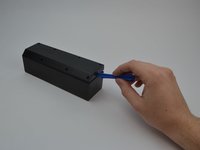
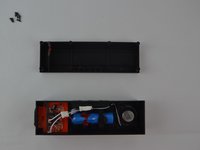
Use plastic opening tool to pry off back plate.
-
Move the plastic opening tool along the the device to further pry open the device.
-
-
-
-
-
-
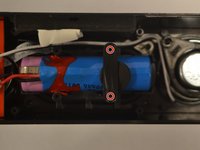
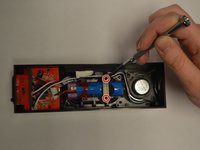
Identify the two Phillips (Length-5/16", Head-1/8") screws holding the battery in place and remove them using a #1 screwdriver.
-
-
-
Remove the ICR18650-26M battery from its position by pulling upwards and out of the casing.
-
-





To reassemble your device, follow these instructions in reverse order.
Cancel: I did not complete this guide.
One other person completed this guide.

Team

USF Tampa, Team 11-3, Cheng Spring 2016 Member of USF Tampa, Team 11-3, Cheng Spring 2016
USFT-CHENG-S16S11G3
5 Members
72 Guides authored
