
Philips Sonicare DiamondClean Case Replacement

Zachary Bertrand and 5 other contributors
Last updated on Dec 21, 2022
Views: 12K
View statistics:
- Past 24 Hours:
- 14
- Past 7 Days:
- 83
- Past 30 Days:
- 313
- All Time:
- 11,814
Comments: 8
6 comments on steps, 2 guide comments.
Go to guide commentsCompleted: 5 6
5 people have marked this guide "completed." Will you be next?
6 people have marked this guide "completed." Including you — great job!
Favorites: 2 3
2 people have favorited (and subscribed to) this guide. Will you be next?
3 people have favorited (and subscribed to) this guide — including you!
Incorrect Tools
Help make this guide better by using the correct tools in images and/or text.
Introduction
Go to step 1 ↓This guide will show you how to remove the outer case from your (9300 Series) Philips Sonicare DiamondClean toothbrush. This case protects the internal parts from water and toothbrushing products. If you notice the buttons are not working properly or if the toothbrush is not charging as well as it used to, residue buildup may be the problem. Replacing the outer case will help your toothbrush to maintain proper contact with the charging base and will allow the buttons to function normally again.
What you need
Tools
-
Spudger4.9

-
-
-
-
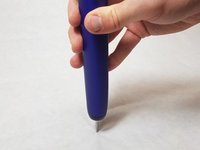
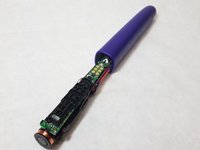
Put the metal head on a solid surface with handle perpendicular to the surface. Firmly, yet gently, push down until the internals start to slide out.
-


 Ask FixBot


To reassemble your device, follow these instructions in reverse order.
Cancel: I did not complete this guide.
5 other people completed this guide.

Team

IUPUI, Team S22-G1, Bayer Fall 2017 Member of IUPUI, Team S22-G1, Bayer Fall 2017
IUPUI-BAYER-F17S22G1
4 Members
36 Guides authored
2 Guide Comments
THANKS SO MUCH , this work very well !
Philips sonicare DiamondClean (HX93xx/xx)
Habe die HX9330 zerlegt, sie funktioniert, der Drucksensor am gehäuse ist defekt
können sie mir ein neues gehäuse zusenden gegen rechnung - helles Gehäuse
Mit freundliche Grüssen
Walter Kolbenschlag
Egerer Strasse 27
91207 Lauf a.d.Peg.
09123 96 89 27
0172 61 00 388
