Free Shipping on Domestic Orders $75+

Philips Sonicare 9350 Battery Replacement

What you need

  1. Philips Sonicare 9350 Battery Replacement, Head removal: step 1, image 1 of 2 Philips Sonicare 9350 Battery Replacement, Head removal: step 1, image 2 of 2
    • Remove the toothbrush head.

    • Use a screwdriver to pry gently around the bottom of the toothbrush.

  2. Philips Sonicare 9350 Battery Replacement, Remove the bottom: step 2, image 1 of 3 Philips Sonicare 9350 Battery Replacement, Remove the bottom: step 2, image 2 of 3 Philips Sonicare 9350 Battery Replacement, Remove the bottom: step 2, image 3 of 3
    • After the bottom of the toothbrush is pried loose, remove it from the base of the brush.

  3. Philips Sonicare 9350 Battery Replacement: step 3, image 1 of 3 Philips Sonicare 9350 Battery Replacement: step 3, image 2 of 3 Philips Sonicare 9350 Battery Replacement: step 3, image 3 of 3
    • Use a spudger to open the two clasps inside the toothbrush handle in a downward motion.

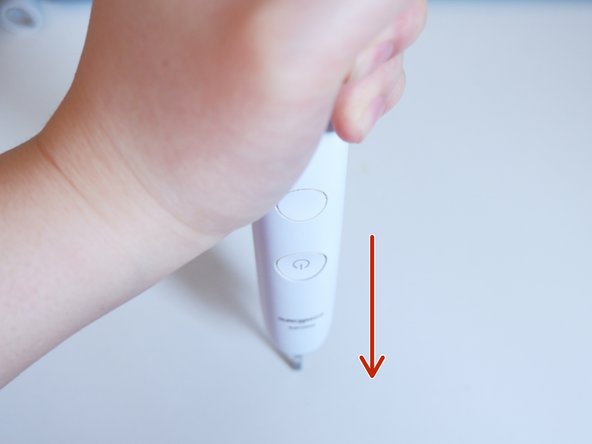
    • Turn the toothbrush upside down and push down on a hard surface—this will slide the toothbrush's internal body out.

  4. Philips Sonicare 9350 Battery Replacement, Extract the internals: step 4, image 1 of 2 Philips Sonicare 9350 Battery Replacement, Extract the internals: step 4, image 2 of 2
    • Pull out the internals of the toothbrush.

  5. Philips Sonicare 9350 Battery Replacement, Access the battery: step 5, image 1 of 2 Philips Sonicare 9350 Battery Replacement, Access the battery: step 5, image 2 of 2
    • Open the protective cover of the battery.

    • Check the battery model.

    • In this case, the model is a Sony 680mhA lithium battery.

  6. Philips Sonicare 9350 Battery Replacement, Desolder both terminals: step 6, image 1 of 3 Philips Sonicare 9350 Battery Replacement, Desolder both terminals: step 6, image 2 of 3 Philips Sonicare 9350 Battery Replacement, Desolder both terminals: step 6, image 3 of 3
    • Open the protection cover of the circuit board.

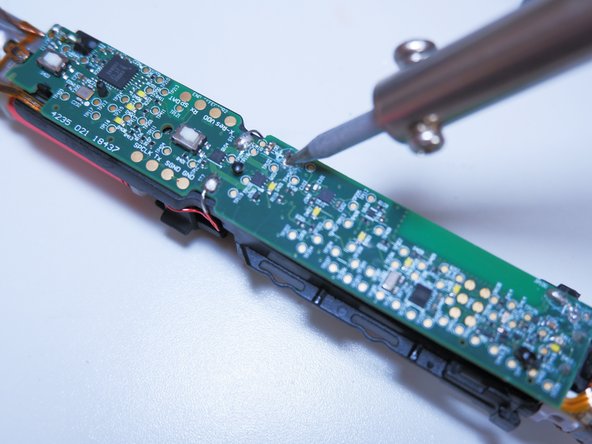
    • Find the welding points of the positive and negative electrodes of the battery and use the soldering iron to desolder.

    • The battery will fall off after desoldering as shown in the figure.

    • Be careful not to touch other parts of the circuit board when desoldering.

  7. Philips Sonicare 9350 Battery Replacement, Install a new battery: step 7, image 1 of 3 Philips Sonicare 9350 Battery Replacement, Install a new battery: step 7, image 2 of 3 Philips Sonicare 9350 Battery Replacement, Install a new battery: step 7, image 3 of 3
    • Use a spudger to pry the battery out at a 45 degree angle.

    • After successfully removing the battery, install the new battery using the reverse procedure.

    • Always use ESD safe tools when working on a circuit board or with batteries such as a nylon spudger.

Conclusion

To reassemble your device, follow these instructions in reverse order.

5 other people completed this guide.

Dongyi Lin

Member since: 05/10/21

273 Reputation

1 Guide authored

1 Guide Comment

All good advice and it works too. Ignore Philips advice that the battery is not replaceable. It is, with correct knowledge and understanding. Thanks for posting.

Shreds - Reply Share

Add Comment

View Statistics:

Past 24 Hours: 9

Past 7 Days: 68

Past 30 Days: 198

All Time: 13,790