This translation was generated by a machine and has not been reviewed by a person yet. Speak this language? Review it.

Philips Roller Controller Repair

willy and one other contributor
Last updated on Sep 2, 2026
Views: 375
View statistics:
- Past 24 Hours:
- 2
- Past 7 Days:
- 14
- Past 30 Days:
- 66
- All Time:
- 375
Comments: 0
No one has left comments on this guide. Will you be first?
Go to guide commentsCompleted: 1 2
1 person has marked this guide "completed." Will you be next?
2 people have marked this guide "completed." Including you — great job!
Favorites: 0 1
No one has favorited (and subscribed to) this guide. Will you be the first?
1 person has favorited (and subscribed to) this guide — and that's you!
Community-Contributed Guide
An awesome member of our community made this guide. It was not created by iFixit staff.
What you need
Parts
Tools


-
-
-
Remove the 5 screws on the bottom edge.
 Ask FixBot
-
-
-
Detach the top cover.
-
Watch out for the connector for the buttons on the right side. Disconnect it.
-
-
-
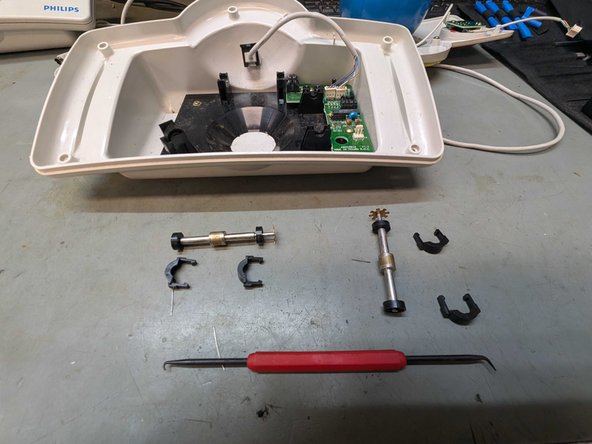
You can pull the tabs on both sides slightly outward and then carefully pull the clip upward.
-
Use a pick to carefully release the bearing retainer.
-
-
-
Replacement parts you need:
-
4x LTR-301 Infrared Receiver
-
4x LTE-302 Infrared Emitter
-
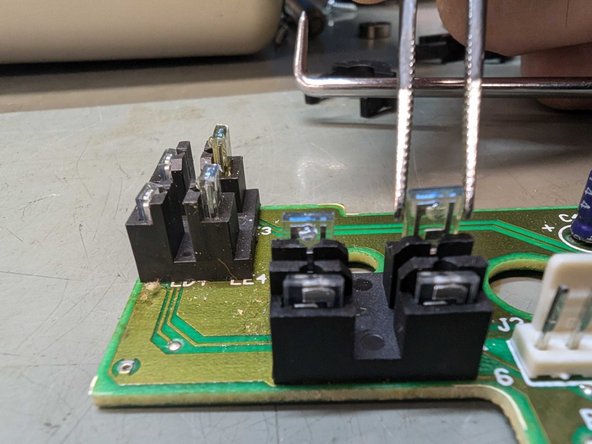
The emitters, LTE-302, are mounted on the inside and replace the BLUE-tinted emitters.
-
The receivers are positioned against the outer edge of the board. These are the LTR-301 types.
-
Often only the emitters are faulty, but we prefer to replace both the emitters and the receivers.
-
-
-
-
Desolder the emitters.
-
Place the replacement parts and solder them back into place with a little flux.
-
Ensure that you place the parts neatly into the holder and that both the receiver and the transmitter are at the same height.
-
-






To reassemble your device, follow these instructions in reverse order.
Cancel: I did not complete this guide.
One other person completed this guide.


