Introduction
This guide will lead users through the process of replacing a faulty touch screen. This may be required if the touch screen is unresponsive or does not turn on.
What you need
-
-
-
Insert a nylon spudger underneath the top of the device.
-
Leverage the tool and pop off each of the eight tabs holding the plastic cover in place.
 Ask FixBot
-
-
-
Remove the four 12.4 mm screws in each of the corners using a JIS #1 screwdriver.
-
-
-
-
-
-
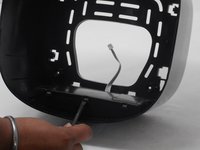
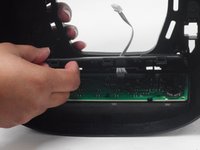
Remove the back panel from the touch screen motherboard by popping the tabs off using the nylon spudger.
-
-



To reassemble your device, follow these instructions in reverse order.
Cancel: I did not complete this guide.
5 other people completed this guide.

Team

University of Memphis, Team 3-1, Sneed Spring 2024 Member of University of Memphis, Team 3-1, Sneed Spring 2024
UM-SNEED-S24S3G1
4 Members
60 Guides authored
