Free Shipping on Domestic Orders $75+

Pentax ZX-5n Flash Pivot Replacement

What you need

  1. Pentax ZX-5n Flash Pivot Replacement, Remove back cover: step 1, image 1 of 1
    • Push down on the screw to depress the spring loaded hinge and release the door.

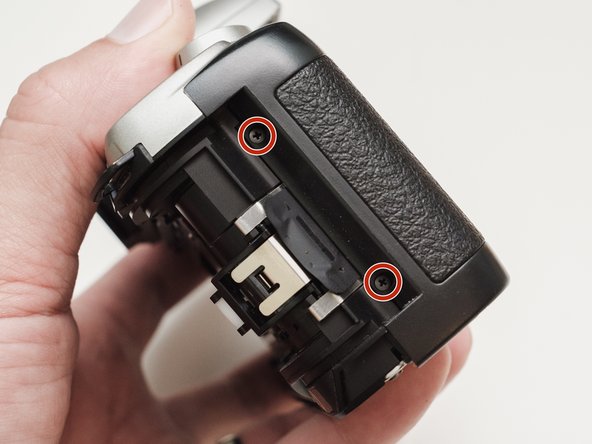
  2. Pentax ZX-5n Flash Pivot Replacement, Remove bottom cover: step 2, image 1 of 1
    • Remove six 5.3 mm #00 screws.

    • Remove one 3.4 mm #00 screw.

    • The short screw has a machine thread and screws into the plate underneath. The rest screw into the plastic body.

  3. Pentax ZX-5n Flash Pivot Replacement, Remove left front cover: step 3, image 1 of 1
    • Remove three 5.3 mm #00 screws (the bottom-most screw is not always present).

    • Remove one 7.3 mm #00 screw.

    • Remove the remote trigger cover.

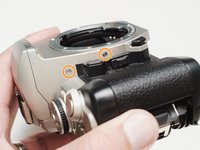
  4. Pentax ZX-5n Flash Pivot Replacement, Remove front cover: step 4, image 1 of 2 Pentax ZX-5n Flash Pivot Replacement, Remove front cover: step 4, image 2 of 2
    • Remove one 3.4 mm #00 screw.

    • Remove two 5.3 mm #00 screw.

    • Gently lift up on the flash housing to help remove the cover if necessary.

  5. Pentax ZX-5n Flash Pivot Replacement, Remove right front cover: step 5, image 1 of 1
    • Remove two 3.9 mm #00 screws.

  6. Pentax ZX-5n Flash Pivot Replacement, Remove eye cup: step 6, image 1 of 1
    • Slide the eye cup up and off to access the screws underneath.

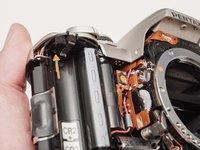
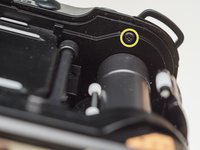
  7. Pentax ZX-5n Flash Pivot Replacement, Unscrew top cover: step 7, image 1 of 3 Pentax ZX-5n Flash Pivot Replacement, Unscrew top cover: step 7, image 2 of 3 Pentax ZX-5n Flash Pivot Replacement, Unscrew top cover: step 7, image 3 of 3
    • Remove two 5.3 mm #00 screws by the eyepiece.

    • Remove one 6.8 mm #00 screw in the battery compartment.

    • Remove one 7.0 mm #00 screw near the take up spool.

  8. Pentax ZX-5n Flash Pivot Replacement, Lift top cover: step 8, image 1 of 1
    • Lift the cover so it is just free of the body. It is still attached by several wires.

  9. Pentax ZX-5n Flash Pivot Replacement, Discharge flash capacitors: step 9, image 1 of 1
    • Use a 1kΩ-10kΩ resistor to discharge the capacitor. Place the resistor between the blue wire, exposed in the previous step, and ground.

    • The flash capacitors store energy at a very high voltage. Failing to discharge the capacitors properly could result in personal injury and/or damage to the camera.

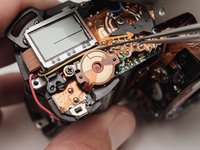
  10. Pentax ZX-5n Flash Pivot Replacement, Unsolder flash connections: step 10, image 1 of 1
    • Unsolder one green wire.

    • Unsolder one blue wire.

    • Unsolder one brown wire.

    • Unsolder one black wire.

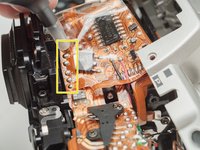
  11. Pentax ZX-5n Flash Pivot Replacement, Unsolder remaining connections: step 11, image 1 of 3 Pentax ZX-5n Flash Pivot Replacement, Unsolder remaining connections: step 11, image 2 of 3 Pentax ZX-5n Flash Pivot Replacement, Unsolder remaining connections: step 11, image 3 of 3
    • Unsolder one black wire.

    • Pull black wire out from its routed location.

    • Unsolder flex connector

    • Be careful not to overheat the flex circuit. Work in short durations. Allow for cool downs in between if necessary.

    • Some repairs can be performed with the top cover still connected but the flex connection is fragile and easily damaged.

  12. Pentax ZX-5n Flash Pivot Replacement, Pop up the flash: step 12, image 1 of 1
    • Push the release button to pop up the flash.

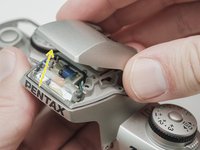
  13. Pentax ZX-5n Flash Pivot Replacement, Remove flash cover: step 13, image 1 of 3 Pentax ZX-5n Flash Pivot Replacement, Remove flash cover: step 13, image 2 of 3 Pentax ZX-5n Flash Pivot Replacement, Remove flash cover: step 13, image 3 of 3
    • Remove two 2.9mm #000 screws.

    • Remove two 4.4 mm #00 screws.

    • Close the flash and lift off the top cover.

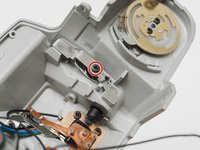
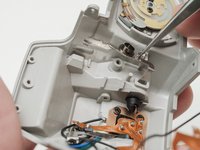
  14. Pentax ZX-5n Flash Pivot Replacement, Remove flash latch: step 14, image 1 of 3 Pentax ZX-5n Flash Pivot Replacement, Remove flash latch: step 14, image 2 of 3 Pentax ZX-5n Flash Pivot Replacement, Remove flash latch: step 14, image 3 of 3
    • Remove one 3.4 mm #00 screw.

    • Remove the latch spring.

    • Remove the latch plate. The flash will try to pop up when it is removed.

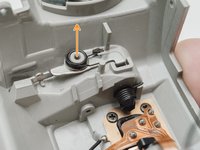
  15. Pentax ZX-5n Flash Pivot Replacement, Remove pop up spring: step 15, image 1 of 1
    • Release the spring arm from the post.

    • Remove the pop up spring.

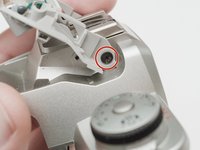
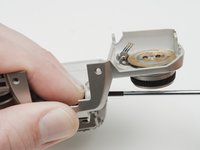
  16. Pentax ZX-5n Flash Pivot Replacement, Remove the flash pivot: step 16, image 1 of 2 Pentax ZX-5n Flash Pivot Replacement, Remove the flash pivot: step 16, image 2 of 2
    • Remove one 3.3 mm #00 screw.

    • Hold the pivot in place while unscrewing.

  17. Pentax ZX-5n Flash Pivot Replacement, Install screw: step 17, image 1 of 1
    • When using the 3D printed part supplied on the device page, install a 4mm #00 screw in the end of the pivot to hold it together.

Conclusion

To reassemble your device, follow these instructions in reverse order.

3 other people completed this guide.

Sam Gustafson

Member since: 09/01/22

10,675 Reputation

69 Guides authored

0 Guide Comments

Add Comment

View Statistics:

Past 24 Hours: 3

Past 7 Days: 25

Past 30 Days: 41

All Time: 1,034