Free Shipping on Domestic Orders $75+

Pentax ZX-5n Flash Capacitor Unit

What you need

  1. Pentax ZX-5n Flash Capacitor Unit, Remove back cover: step 1, image 1 of 1
    • Push down on the screw to depress the spring loaded hinge and release the door.

    Ask FixBot

    Add Comment

  2. Pentax ZX-5n Flash Capacitor Unit, Remove bottom cover: step 2, image 1 of 1
    • Remove six 5.3 mm #00 screws.

    • Remove one 3.4 mm #00 screw.

    • The short screw has a machine thread and screws into the plate underneath. The rest screw into the plastic body.

    Ask FixBot

    Add Comment

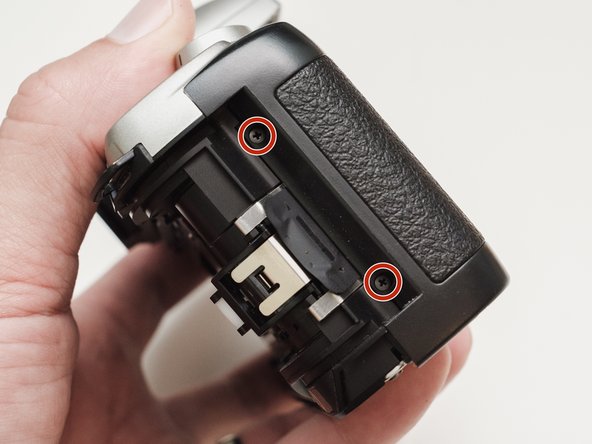
  3. Pentax ZX-5n Flash Capacitor Unit, Remove left front cover: step 3, image 1 of 1
    • Remove three 5.3 mm #00 screws (the bottom-most screw is not always present).

    • Remove one 7.3 mm #00 screw.

    • Remove the remote trigger cover.

    Ask FixBot

    Add Comment

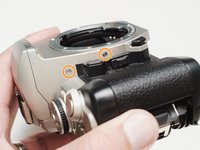
  4. Pentax ZX-5n Flash Capacitor Unit, Remove front cover: step 4, image 1 of 2 Pentax ZX-5n Flash Capacitor Unit, Remove front cover: step 4, image 2 of 2
    • Remove one 3.4 mm #00 screw.

    • Remove two 5.3 mm #00 screw.

    • Gently lift up on the flash housing to help remove the cover if necessary.

    Ask FixBot

    Add Comment

  5. Pentax ZX-5n Flash Capacitor Unit, Remove right front cover: step 5, image 1 of 1
    • Remove two 3.9 mm #00 screws.

    Ask FixBot

    Add Comment

  6. Pentax ZX-5n Flash Capacitor Unit, Remove eye cup: step 6, image 1 of 1
    • Slide the eye cup up and off to access the screws underneath.

    Ask FixBot

    Add Comment

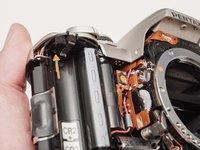
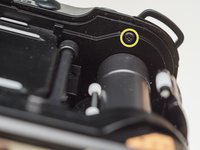
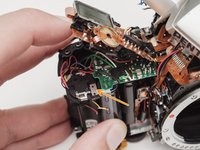
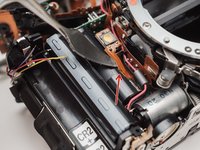
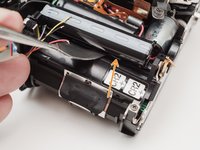
  7. Pentax ZX-5n Flash Capacitor Unit, Unscrew top cover: step 7, image 1 of 3 Pentax ZX-5n Flash Capacitor Unit, Unscrew top cover: step 7, image 2 of 3 Pentax ZX-5n Flash Capacitor Unit, Unscrew top cover: step 7, image 3 of 3
    • Remove two 5.3 mm #00 screws by the eyepiece.

    • Remove one 6.8 mm #00 screw in the battery compartment.

    • Remove one 7.0 mm #00 screw near the take up spool.

    Ask FixBot

    Add Comment

  8. Pentax ZX-5n Flash Capacitor Unit, Lift top cover: step 8, image 1 of 1
    • Lift the cover so it is just free of the body. It is still attached by several wires.

    Ask FixBot

    Add Comment

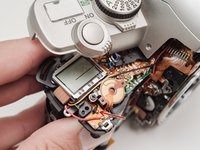
  9. Pentax ZX-5n Flash Capacitor Unit, Discharge flash capacitors: step 9, image 1 of 1
    • Use a 1kΩ-10kΩ resistor to discharge the capacitor. Place the resistor between the blue wire, exposed in the previous step, and ground.

    • The flash capacitors store energy at a very high voltage. Failing to discharge the capacitors properly could result in personal injury and/or damage to the camera.

    Ask FixBot

    Add Comment

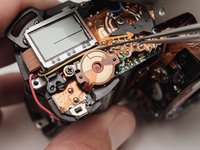
  10. Pentax ZX-5n Flash Capacitor Unit, Unsolder flash connections: step 10, image 1 of 1
    • Unsolder one green wire.

    • Unsolder one blue wire.

    • Unsolder one brown wire.

    • Unsolder one black wire.

    Ask FixBot

    Add Comment

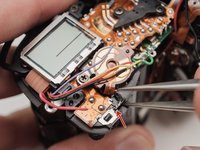
  11. Pentax ZX-5n Flash Capacitor Unit, Unsolder remaining connections: step 11, image 1 of 3 Pentax ZX-5n Flash Capacitor Unit, Unsolder remaining connections: step 11, image 2 of 3 Pentax ZX-5n Flash Capacitor Unit, Unsolder remaining connections: step 11, image 3 of 3
    • Unsolder one black wire.

    • Pull black wire out from its routed location.

    • Unsolder flex connector

    • Be careful not to overheat the flex circuit. Work in short durations. Allow for cool downs in between if necessary.

    • Some repairs can be performed with the top cover still connected but the flex connection is fragile and easily damaged.

    Ask FixBot

    Add Comment

  12. Pentax ZX-5n Flash Capacitor Unit, De-solder battery connections: step 12, image 1 of 1
    • De-solder the indicated joints. Use a solder sucker on the tabbed connections.

    • Pull the black wire from the battery flex to get more slack in the connection to the top cover.

    • Be careful not to overheat the flex circuit. Work in short durations. Allow for cool downs in between if necessary.

    Ask FixBot

    Add Comment

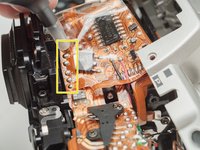
  13. Pentax ZX-5n Flash Capacitor Unit, De-solder flex posts: step 13, image 1 of 1
    • Use a solder sucker to de-solder the four posts from the flex circuit.

    • This is the most difficult part of the repair. Patience and persistence are required.

    • Be careful not to overheat the flex circuit. Work in short durations. Allow for cool downs in between if necessary.

    Ask FixBot

    Add Comment

  14. Pentax ZX-5n Flash Capacitor Unit, De-solder flex connections: step 14, image 1 of 1
    • Unsolder film advance motor connections.

    • Unsolder sprocket counter connections.

    • Unsolder power and ground connections.

    • Unsolder panorama switch connections.

    • Be careful not to overheat the flex circuit. Work in short durations. Allow for cool downs in between if necessary.

    Ask FixBot

    Add Comment

  15. Pentax ZX-5n Flash Capacitor Unit, Unscrew flex circuit: step 15, image 1 of 1
    • Remove one 4.3 mm #00 screw.

    Ask FixBot

    Add Comment

  16. Pentax ZX-5n Flash Capacitor Unit, Lift the flex circuit: step 16, image 1 of 2 Pentax ZX-5n Flash Capacitor Unit, Lift the flex circuit: step 16, image 2 of 2
    • Gently pry up the plastic carrier under the flex circuit. It may catch slightly on the battery contact tab.

    • Pay close attention to the connections around the four through-hole posts as you lift the flex. Make sure that no solder is left over and that it pulls away freely.

    • This metal tab is lightly held in place with lacquer and can easily come loose. Keep an eye on it.

    Ask FixBot

    Add Comment

  17. Pentax ZX-5n Flash Capacitor Unit, Unscrew flash PCB: step 17, image 1 of 1
    • Remove one 3.3mm #00 screw.

    • Remove one 3.9 #00 screw.

    • De-solder the red wire.

    • Peel off the black tape. Leave it attached to the wires.

    Ask FixBot

    Add Comment

  18. Pentax ZX-5n Flash Capacitor Unit, Remove flash PCB and capacitors: step 18, image 1 of 2 Pentax ZX-5n Flash Capacitor Unit, Remove flash PCB and capacitors: step 18, image 2 of 2
    • Gently peel the flex circuit from the surface of the capacitor.

    • There may be additional adhesive underneath the larger capacitor.

    • Lift the two capacitors and the flash PCB out as a single unit.

    • The double sided tape used to secure the capacitors can be softened with isopropyl alcohol if necessary.

    Ask FixBot

    Add Comment

Conclusion

To reassemble your device, follow these instructions in reverse order.

Cancel: I did not complete this guide.

Sam Gustafson

Member since: 09/01/22

11,000 Reputation

78 Guides authored

0 Guide Comments

Add Comment

View Statistics:

Past 24 Hours: 1

Past 7 Days: 3

Past 30 Days: 21

All Time: 676