
Pentax PZ-10 Back Cover Locking Switch Spring Replacement

Ryan Su and 8 other contributors
Last updated on Jan 15, 2026
Views: 905
View statistics:
- Past 24 Hours:
- 1
- Past 7 Days:
- 16
- Past 30 Days:
- 86
- All Time:
- 905
Comments: 0
No one has left comments on this guide. Will you be first?
Go to guide commentsCompleted: 1 2
1 person has marked this guide "completed." Will you be next?
2 people have marked this guide "completed." Including you — great job!
Favorites: 0 1
No one has favorited (and subscribed to) this guide. Will you be the first?
1 person has favorited (and subscribed to) this guide — and that's you!
Better Introduction
Improve this guide by completing or revising its introduction.
Introduction
Go to step 1 ↓If the back cover of the Pentax PZ-10 won't lock in place, the spring that holds the door in place may need to be replaced.
What you need
Tools


-
-
-
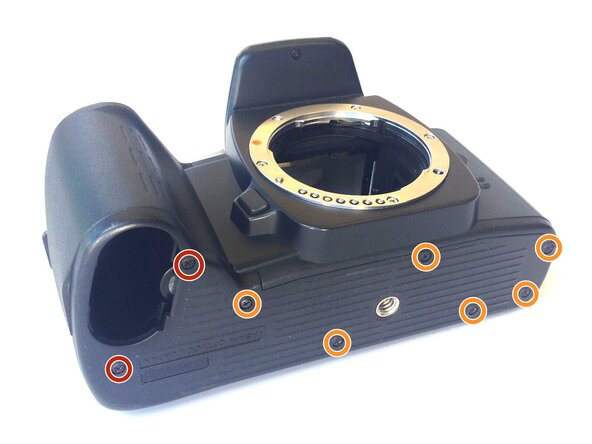
With the lens face up and the bottom panel of the camera facing you, remove the two 7mm screws on the left using the J0 screwdriver.
-
Remove the six 4.3mm screws in the middle and right of the panel using the J0 screwdriver.
-
Pull off the bottom casing to remove.
 Ask FixBot
-
-
-
With the screws removed, the bottom casing should come off very easily by pulling on the casing.
-
-
-
Press down on the locking switch on the side panel facing you.
-
-
Tool used on this step:Tweezers$4.99
-
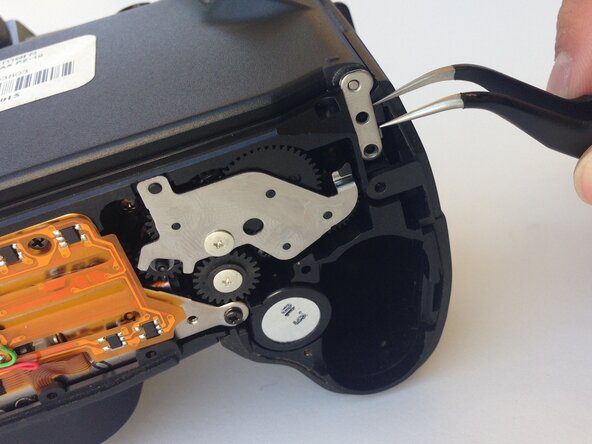
Using a pair of tweezers, gently remove the metal tab securing the back door axle.
-
-
-
-
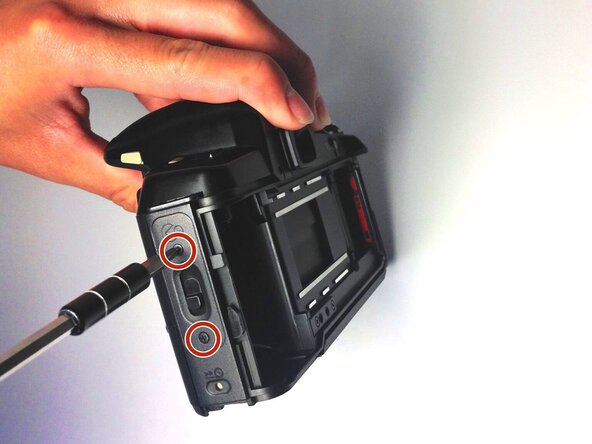
Once the back cover is fully removed, remove the two 4.35mm screws attaching the cover of the unlocking switch, and remove the plate.
-
-
-
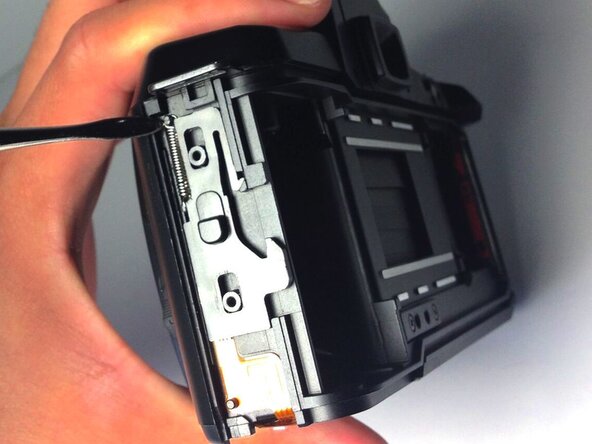
Locate the spring at the upper left corner of the face, and pull the rings of the spring off of the pins to remove it using plastic opening tools.
-
-



To reassemble your device, follow these instructions in reverse order.
Cancel: I did not complete this guide.
One other person completed this guide.

