
Pentax Optio S4i Battery Replacement

Nicole Wong and 4 other contributors
Last updated on Jan 28, 2014
Views: 3.9K
View statistics:
- Past 24 Hours:
- 3
- Past 7 Days:
- 20
- Past 30 Days:
- 109
- All Time:
- 3,880
Comments: 1
1 guide comment.
Go to guide commentsCompleted: 2 3
2 people have marked this guide "completed." Will you be next?
3 people have marked this guide "completed." Including you — great job!
Favorites: 1 2
1 person has favorited (and subscribed to) this guide. Will you be next?
2 people have favorited (and subscribed to) this guide — including you!
Introduction
Go to step 1 ↓This guide will teach you how to properly remove and insert the camera's battery.
-
-
-
Flip camera over to bottom side. Slide battery cover to the right and flip open.
 Ask FixBot
-
-
-
-
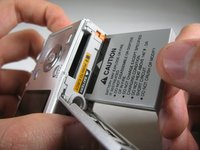
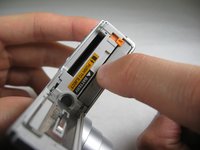
To reinsert battery, if necessary repeat Step 1. Insert battery so that the side of the battery with "CAUTION" below the black bar with an arrow faces the label "BATTERY". Make sure to push battery until small, orange lever holds battery in place. Close battery cover.
-
-


Cancel: I did not complete this guide.
2 other people completed this guide.

Team

Cal Poly, Team 4-29, Regan Winter 2011 Member of Cal Poly, Team 4-29, Regan Winter 2011
CPSU-REGAN-W11S4G29
3 Members
60 Guides authored
1 Guide Comment
Hello,
My battery is stuck - even though I push the lever I can’t get a grip on the battery,
Thank you
