Introduction
This guide shows how to remove the mechanism that governs the slower shutter speeds of the Pentax MX. When the mechanism gets dirty, the speeds may become inaccurate and may even prevent the closing curtain from traveling at all. Removing the mechanism for cleaning can help restore proper functionality.
Note: Installing the slow speed governor in a position even slightly different than its previous position can change the accuracy of the shutter speeds. Care should be taken to document the current position before removing. Alternatively, a shutter speed tester can be used to confirm the speeds after reinstallation.
What you need
-
-
Remove three M1.7 x 2.0 mm countersunk screws.
-
Lift off bottom cover.
-
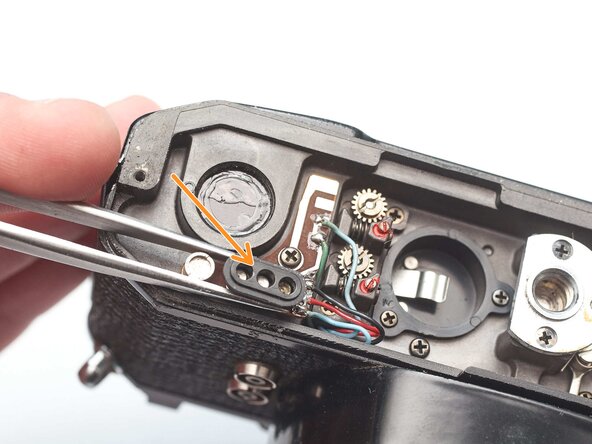
Remove loose plastic housing for motor drive contacts.
 Ask FixBot
-
-
-
The amount of overlap between these levers is critical to timing the delay in the closing curtain.
-
If the amount of overlap changes after reinstallation, the shutter speeds could be inaccurate.
-
Before removal, mark the amount of engagement with paint or marker. Alternatively, photograph the amount of engagement at several different shutter speeds.
-
-
-
-
Remove one M1.7 x 2.8 mm screw.
-
Remove one M1.4 x 2.7 mm screw.
-
Lift out slow speed governor.
-
-
-
Ensure that the feeler arms are properly engaging with the setting cams.
-
To adjust the timing of the slow shutter speeds, first loosen the lock screw.
-
Turn the eccentric adjustment...
-
The change the amount of overlap here.
-



To reassemble your device, follow these instructions in reverse order.

