Free Shipping on Domestic Orders $75+

Pentax MX Shutter Assembly Removal

What you need

  1. Pentax MX Shutter Assembly Removal, Remove film advance lever: step 1, image 1 of 3 Pentax MX Shutter Assembly Removal, Remove film advance lever: step 1, image 2 of 3 Pentax MX Shutter Assembly Removal, Remove film advance lever: step 1, image 3 of 3
    • Remove the lever cap. The cap is reverse threaded.

    • Lift off the advance lever.

    • Remove the collar beneath the lever.

    Ask FixBot

    Add Comment

  2. Pentax MX Shutter Assembly Removal, Remove shutter speed dial: step 2, image 1 of 2 Pentax MX Shutter Assembly Removal, Remove shutter speed dial: step 2, image 2 of 2
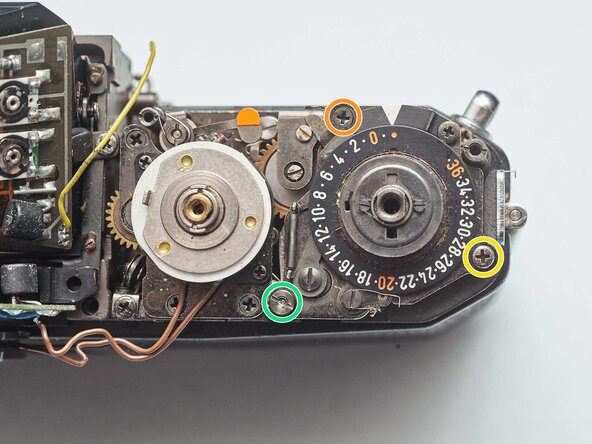
    • Set the ISO to 100 and the shutter speed to 1000.

    • Remove one pin head screw.

    • Lift off shutter speed dial.

    • Remove the collar beneath the dial.

    • Installation Notes: Make sure that the tab on the shutter speed resistor mates properly with this slot on the shutter speed dial.

    Ask FixBot

    Add Comment

  3. Pentax MX Shutter Assembly Removal, Remove rewind knob: step 3, image 1 of 3 Pentax MX Shutter Assembly Removal, Remove rewind knob: step 3, image 2 of 3 Pentax MX Shutter Assembly Removal, Remove rewind knob: step 3, image 3 of 3
    • Place a tool in the fork of the rewind shaft. Turn the rewind knob counterclockwise to loosen it.

    • Remove the lock ring underneath the rewind knob.

    • Remove the cover plate.

    Ask FixBot

    Add Comment

  4. Pentax MX Shutter Assembly Removal, Remove top cover: step 4, image 1 of 3 Pentax MX Shutter Assembly Removal, Remove top cover: step 4, image 2 of 3 Pentax MX Shutter Assembly Removal, Remove top cover: step 4, image 3 of 3
    • Remove two M1.7 x 3.2 mm screws.

    • Remove two M1.7 x 2 mm countersunk screws.

    • Lift off top cover.

    • The release cable pin in the shutter button is loose and may fall out.

    Ask FixBot

    Add Comment

  5. Pentax MX Shutter Assembly Removal, Remove front leatherette panels: step 5, image 1 of 3 Pentax MX Shutter Assembly Removal, Remove front leatherette panels: step 5, image 2 of 3 Pentax MX Shutter Assembly Removal, Remove front leatherette panels: step 5, image 3 of 3
    • Apply isopropyl alcohol to soften the leatherette adhesive.

    • Turn the self-timer lever to the charged position.

    • Peel the leatherette off the camera body, carefully working it over the self-timer lever.

    • Remove one loose cover panel.

    • Repeat for the opposite panel.

    • Installation Notes: Clean all the old adhesive off of the camera body and leatherette panels before reapplying. Use contact cement to attach.

    Ask FixBot

    Add Comment

  6. Pentax MX Shutter Assembly Removal, Unsolder aperture resistor: step 6, image 1 of 1
    • Unsolder two yellow wires for the aperture resistor.

    Ask FixBot

    Add Comment

  7. Pentax MX Shutter Assembly Removal, Remove front board: step 7, image 1 of 3 Pentax MX Shutter Assembly Removal, Remove front board: step 7, image 2 of 3 Pentax MX Shutter Assembly Removal, Remove front board: step 7, image 3 of 3
    • Remove four M1.9 x 3.9 mm screws.

    • Lift off front board.

    • Look for shim washers at the screw locations and note their positions.

    Ask FixBot

    Add Comment

  8. Pentax MX Shutter Assembly Removal, Remove bottom cover: step 8, image 1 of 2 Pentax MX Shutter Assembly Removal, Remove bottom cover: step 8, image 2 of 2
    • Remove three M1.7 x 2.0 mm countersunk screws.

    • Lift off bottom cover.

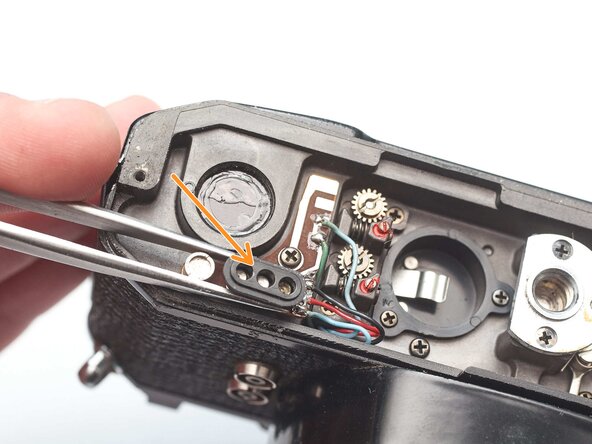
    • Remove loose plastic housing for motor drive contacts.

    Ask FixBot

    Add Comment

  9. Pentax MX Shutter Assembly Removal, Remove light baffle: step 9, image 1 of 2 Pentax MX Shutter Assembly Removal, Remove light baffle: step 9, image 2 of 2
    • Remove four M1.9 x 3.8 mm screws.

    • Lift off light baffle.

    • Use isopropyl alcohol to soften adhesive and detach wires from the backside of the baffle.

    Ask FixBot

    Add Comment

  10. Pentax MX Shutter Assembly Removal, Unsolder shutter speed resistor: step 10, image 1 of 1
    • Unsolder two brown wires for the shutter speed resistor.

    Ask FixBot

    Add Comment

  11. Pentax MX Shutter Assembly Removal, Unsolder flash sync connections: step 11, image 1 of 1
    • Unsolder one gray for the x-sync.

    • Unsolder one white wire for the FP sync.

    Ask FixBot

    Add Comment

  12. Pentax MX Shutter Assembly Removal, Unsolder motor drive connections: step 12, image 1 of 2 Pentax MX Shutter Assembly Removal, Unsolder motor drive connections: step 12, image 2 of 2
    • Unsolder one green wire for the motor drive connection.

    • Unsolder one blue wire for the LED switch.

    • Unsolder one red wire and one black wire.

    Ask FixBot

    Add Comment

  13. Pentax MX Shutter Assembly Removal, Detach wire routing: step 13, image 1 of 1
    • Open up wire routing guides and remove all wires from them.

    • Pull the black and red wires out of the hole in the bottom of the chassis.

    • Make sure the gray wire is free and can pull away with the mirror box.

    Ask FixBot

    Add Comment

  14. Pentax MX Shutter Assembly Removal, Detach viewfinder LED PCB: step 14, image 1 of 2 Pentax MX Shutter Assembly Removal, Detach viewfinder LED PCB: step 14, image 2 of 2
    • Remove one M1.4 x 2.8 mm screw and washer.

    • Remove one M1.7 x 2.8 mm screw.

    • Pull the LED PCB out of the side of the mirror box.

    • Installation Notes: Install batteries and check the position of the LEDs. Position the PCB as needed then tighten the screws to fix it in place.

    Ask FixBot

    Add Comment

  15. Pentax MX Shutter Assembly Removal, Disengage speed indicator idler gear: step 15, image 1 of 1
    • Loosen the slotted post but do not remove.

    • Slide the idler gear back so that it no longer engages with the speed indicator disc.

    • Installation Notes: See the process for adjusting the viewfinder speed indication after reassembly.

    Ask FixBot

    Add Comment

  16. Pentax MX Shutter Assembly Removal, Remove mirror box: step 16, image 1 of 3 Pentax MX Shutter Assembly Removal, Remove mirror box: step 16, image 2 of 3 Pentax MX Shutter Assembly Removal, Remove mirror box: step 16, image 3 of 3
    • Remove two M1.7 x 4.6 mm screws.

    • Remove two slotted posts.

    • It is possible to remove the mirror box without removing the posts, since the holes can slip over the top, but the process will be easier without them in place.

    • Lift the mirror box up and tilt the top forward to remove it.

    Ask FixBot

    Add Comment

    • It can be helpful to fire the shutter without the mirror box installed in order to troubleshoot certain issues.

    • Temporarily install the wind lever and the shutter speed dial.

    • Wind the camera.

    • Press the shutter release button.

    • Release the opening curtain latch. This is usually done by the mirror box but has to be done manually in this case.

    Ask FixBot

    Add Comment

  17. Pentax MX Shutter Assembly Removal, Remove frame counter assembly: step 18, image 1 of 3 Pentax MX Shutter Assembly Removal, Remove frame counter assembly: step 18, image 2 of 3 Pentax MX Shutter Assembly Removal, Remove frame counter assembly: step 18, image 3 of 3
    • Temporarily replace the wind lever and move it into the stowed position.

    • Remove one M1.7 x 2.4 mm countersunk screw.

    • Remove one M1.7 x 3.8 mm screw.

    • Remove one M1.4 slotted nut.

    • Lift off frame counter mechanism.

    Ask FixBot

    Add Comment

  18. Pentax MX Shutter Assembly Removal, Installation Notes: Frame Count Assembly: step 19, image 1 of 2 Pentax MX Shutter Assembly Removal, Installation Notes: Frame Count Assembly: step 19, image 2 of 2
    • Align the post on the ratcheting gear with the slot in the top wind gear.

    • The frame counter gears will also need to mesh when installed.

    • Check the placement of this spring. It often comes loose.

    Ask FixBot

    Add Comment

  19. Pentax MX Shutter Assembly Removal, Remove shutter speed resistor: step 20, image 1 of 1
    • Remove two screws.

    • Lift off shutter speed resistor.

    Ask FixBot

    Add Comment

  20. Pentax MX Shutter Assembly Removal, Remove speed indicator cable mount: step 21, image 1 of 2 Pentax MX Shutter Assembly Removal, Remove speed indicator cable mount: step 21, image 2 of 2
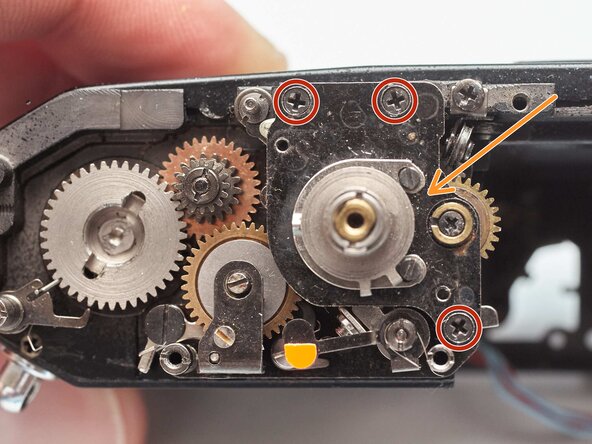
    • Remove two screws.

    • Lift off support plate. It is still connected to the shutter speed dial by a thin cable.

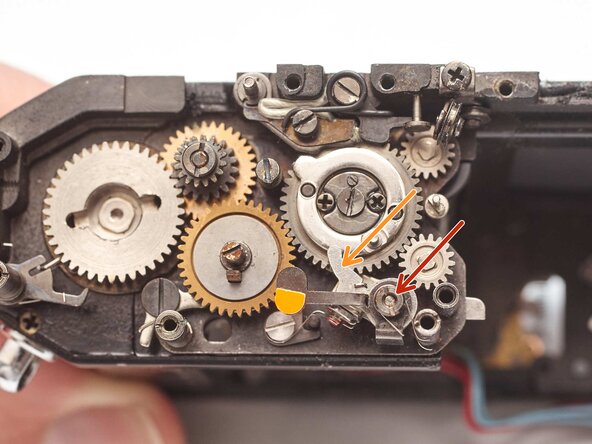
    • Remove two shim washers.

    • Remove the door latch spring arm.

    • Installation Notes: Route the cable through the pulleys as shown before installing the support plate.

    Ask FixBot

    Add Comment

  21. Pentax MX Shutter Assembly Removal, Remove shutter dial assembly: step 22, image 1 of 3 Pentax MX Shutter Assembly Removal, Remove shutter dial assembly: step 22, image 2 of 3 Pentax MX Shutter Assembly Removal, Remove shutter dial assembly: step 22, image 3 of 3
    • Remove three screws.

    • Remove speed selector plate

    • Lift off high speed cam.

    • Remove spacer washer.

    Ask FixBot

    Add Comment

  22. Pentax MX Shutter Assembly Removal, Installation Notes: Shutter Dial Assembly: step 23, image 1 of 3 Pentax MX Shutter Assembly Removal, Installation Notes: Shutter Dial Assembly: step 23, image 2 of 3 Pentax MX Shutter Assembly Removal, Installation Notes: Shutter Dial Assembly: step 23, image 3 of 3
    • Clean the high speed cam and the seat that it operates in. Apply shutter oil to the shaft and hole.

    • Set the speed selector to the '1000' position.

    • The cam for the slow speed governor should be in this position to sync properly with the speed selector.

    • Ensure that the shaft to the slow speed governor couples properly.

    Ask FixBot

    Add Comment

  23. Pentax MX Shutter Assembly Removal, Remove shutter release arm: step 24, image 1 of 1
    • Mark the vertical position of the shutter release arm on the release shaft.

    • Remove two M1.4 x 2.4 mm screws.

    • Remove shutter release arm.

    Ask FixBot

    Add Comment

  24. Pentax MX Shutter Assembly Removal, Remove shutter release shaft: step 25, image 1 of 2 Pentax MX Shutter Assembly Removal, Remove shutter release shaft: step 25, image 2 of 2
    • Remove one M1.4 x 2.4 mm screw.

    • Remove the shutter release plate.

    • Slide the shutter release shaft out from the bottom of the camera.

    • Keep track of the coil spring as it slides off.

    Ask FixBot

    Add Comment

  25. Pentax MX Shutter Assembly Removal, Remove closing curtain latch: step 26, image 1 of 2 Pentax MX Shutter Assembly Removal, Remove closing curtain latch: step 26, image 2 of 2
    • Remove one M1.4 slotted nut.

    • Push the latch out from between the wind gears and slide it off the shaft.

    • Installation Notes: Note the position of the bias springs during installation.

    Ask FixBot

    Add Comment

  26. Pentax MX Shutter Assembly Removal, Remove upper transport gear: step 27, image 1 of 2 Pentax MX Shutter Assembly Removal, Remove upper transport gear: step 27, image 2 of 2
    • Remove one slotted post.

    • Remove plate.

    • Remove upper transport gear latch.

    • Remove upper transport gear.

    Ask FixBot

    Add Comment

  27. Pentax MX Shutter Assembly Removal, Installation Notes: Upper Transport Gear: step 28, image 1 of 2 Pentax MX Shutter Assembly Removal, Installation Notes: Upper Transport Gear: step 28, image 2 of 2
    • Shutter curtains should be in the wound state...

    • And the lower transport gear latch engaged.

    • Place the upper transport gear such that the right side of the slot is as close to the transport latch as possible without touching or rubbing.

    Ask FixBot

    Add Comment

  28. Pentax MX Shutter Assembly Removal, Remove lower transport gear latch: step 29, image 1 of 2 Pentax MX Shutter Assembly Removal, Remove lower transport gear latch: step 29, image 2 of 2
    • Unhook bias spring.

    • Remove one M1.4 x 2.8 mm shoulder screw.

    • Remove lower transport gear latch and bias spring.

    • Remove washer.

    Ask FixBot

    Add Comment

  29. Pentax MX Shutter Assembly Removal, Remove lower transport gear: step 30, image 1 of 1
    • Lift off lower transport gear.

    • Installation Notes: Clean the upper and lower transport gears and the mounting post with isopropyl alcohol. Do not lubricate.

    Ask FixBot

    Add Comment

  30. Pentax MX Shutter Assembly Removal, Remove reverse stop: step 31, image 1 of 2 Pentax MX Shutter Assembly Removal, Remove reverse stop: step 31, image 2 of 2
    • Remove one M1.4 x 2.4 mm screw.

    • Remove washer.

    • Remove bias spring.

    Ask FixBot

    Add Comment

  31. Pentax MX Shutter Assembly Removal, Lubricate shutter: step 32, image 1 of 2 Pentax MX Shutter Assembly Removal, Lubricate shutter: step 32, image 2 of 2
    • Pentax recommends using shutter oil to lubricate areas of the shutter that move rapidly during an exposure. Most of the critical areas can be accessed at this point in the disassembly. Apply the oil sparingly, just enough to coat the bearing surfaces.

    • Lubricate the pinion shafts. On the wind side, the pinions turn in their end pivots. The oil should be between the shafts and the end plates.

    • Lubricate the rollers. On the rewind side, the rollers turn on the fixed shafts. The oil should be between the rollers and the shafts.

    • If the curtain travel times are severely degraded, additional disassembly and cleaning may be necessary before lubrication is applied.

    Ask FixBot

    Add Comment

  32. Pentax MX Shutter Assembly Removal, Remove tripod mount: step 33, image 1 of 1
    • Remove two countersunk screws.

    • Remove tripod mount.

    Ask FixBot

    Add Comment

  33. Pentax MX Shutter Assembly Removal, Remove battery holder: step 34, image 1 of 1
    • Remove two screws.

    • Pull the battery compartment towards the bottom of the camera.

    • Note the routing of the red wire.

    Ask FixBot

    Add Comment

  34. Pentax MX Shutter Assembly Removal, Disconnect motor drive wiring: step 35, image 1 of 1
    • Unsolder two blue wires for the shutter button switch.

    • Unsolder one green wire.

    • Pull the wires out through the hole in the chassis so they are free.

    Ask FixBot

    Add Comment

  35. Pentax MX Shutter Assembly Removal, Detach the flash sync PCB: step 36, image 1 of 1
    • Remove one screw.

    • Lift away the flash sync PCB. It is still connected by the red wires.

    Ask FixBot

    Add Comment

  36. Pentax MX Shutter Assembly Removal, Remove X flash sync contact: step 37, image 1 of 2 Pentax MX Shutter Assembly Removal, Remove X flash sync contact: step 37, image 2 of 2
    • Use isopropyl alcohol to soften the adhesive holding the wires.

    • Remove two screws.

    • Remove the X sync contact.

    • Installation Notes: The contact should be open when the shutter is wound and should close when the opening curtain reaches the end of its travel across the frame.

    Ask FixBot

    Add Comment

  37. Pentax MX Shutter Assembly Removal, Remove main meter switch: step 38, image 1 of 1
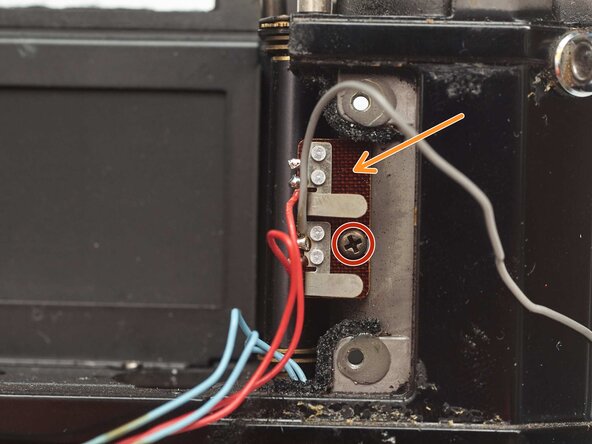
    • Use isopropyl alcohol to soften the adhesive holding the wires.

    • Remove two screws.

    • Lift off the main meter switch and gently pull the blue wires through the hole in the chassis.

    Ask FixBot

    Add Comment

  38. Pentax MX Shutter Assembly Removal, Remove slow speed coupling rod: step 39, image 1 of 2 Pentax MX Shutter Assembly Removal, Remove slow speed coupling rod: step 39, image 2 of 2
    • Remove one circlip.

    • Remove the slow speed coupling rod through the bottom of the chassis.

    • To get the cam stack past the governor plate, first release the shutter. Then rotate the governor plate counter-clockwise. That should provide enough clearance to remove the slow speed coupling rod.

    Ask FixBot

    Add Comment

  39. Pentax MX Shutter Assembly Removal, Remove loose washers: step 40, image 1 of 2 Pentax MX Shutter Assembly Removal, Remove loose washers: step 40, image 2 of 2
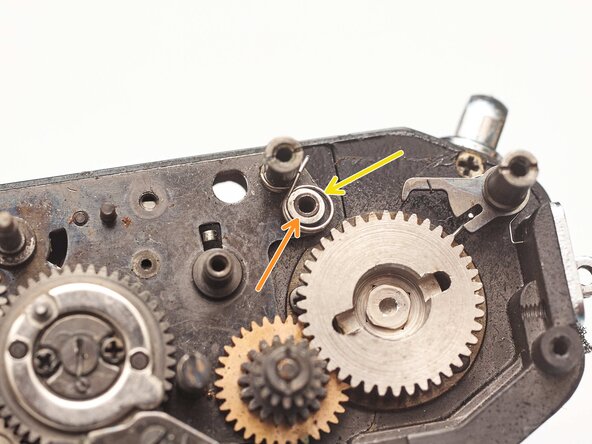
    • Remove one bushing.

    • Remove one shim washer.

    Ask FixBot

    Add Comment

  40. Pentax MX Shutter Assembly Removal, Remove closing curtain delay gear: step 41, image 1 of 1
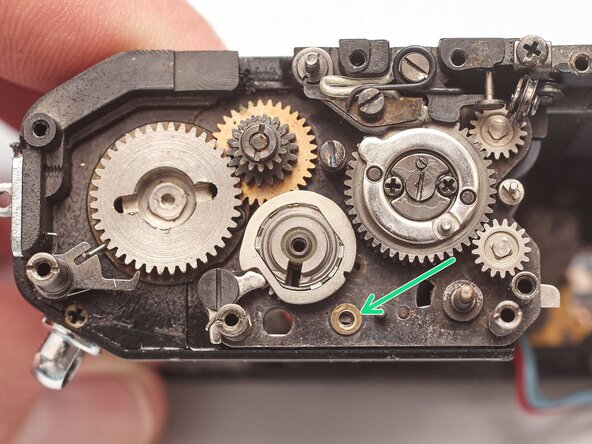
    • Remove one screw.

    • Lift off closing curtain delay gear.

    Ask FixBot

    Add Comment

  41. Pentax MX Shutter Assembly Removal, Installation Notes: Closing Curtain Delay Gear: step 42, image 1 of 3 Pentax MX Shutter Assembly Removal, Installation Notes: Closing Curtain Delay Gear: step 42, image 2 of 3 Pentax MX Shutter Assembly Removal, Installation Notes: Closing Curtain Delay Gear: step 42, image 3 of 3
    • Clean the gear shaft and lubricate with shutter oil.

    • Charge the shutter. Manually push the opening curtain latch forward once the shutter is wound to hold it in position.

    • Temporarily install the slow speed governor.

    • Install the closing curtain delay gear such that the gap between the two governor plates is parallel.

    • Remove the slow speed governor.

    • Check that the stud on the bottom of the gear properly actuates the mirror release lever when the shutter is fired.

    Ask FixBot

    Add Comment

  42. Pentax MX Shutter Assembly Removal, Remove closing curtain pinion gear: step 43, image 1 of 1
    • Remove one slotted screw.

    • Lift off closing curtain pinion gear.

    Ask FixBot

    Add Comment

  43. Pentax MX Shutter Assembly Removal, Remove shutter curtain baffle: step 44, image 1 of 2 Pentax MX Shutter Assembly Removal, Remove shutter curtain baffle: step 44, image 2 of 2
    • Remove two screws.

    • Remove shutter curtain baffle.

    Ask FixBot

    Add Comment

  44. Pentax MX Shutter Assembly Removal, Remove curtain bounce stopper: step 45, image 1 of 2 Pentax MX Shutter Assembly Removal, Remove curtain bounce stopper: step 45, image 2 of 2
    • Remove stopper spring.

    • Remove one slotted post.

    • Remove washer.

    • Measure the distance that the stopper adjustment extends from the rear wall and record the value for reference during reassembly.

    • Remove the slotted stopper adjustment screw.

    Ask FixBot

    Add Comment

  45. Pentax MX Shutter Assembly Removal, Remove indicator cable pulley: step 46, image 1 of 1
    • Remove one screw.

    • Remove indicator cable pulley.

    Ask FixBot

    Add Comment

  46. Pentax MX Shutter Assembly Removal, Remove curtain travel stop: step 47, image 1 of 2 Pentax MX Shutter Assembly Removal, Remove curtain travel stop: step 47, image 2 of 2
    • Remove one slotted screw.

    • Remove oil wick and retainer plate.

    • Remove retaining post using a spanner wrench.

    • Remove curtain travel stop.

    Ask FixBot

    Add Comment

  47. Pentax MX Shutter Assembly Removal, Let down tension in curtain rollers: step 48, image 1 of 2 Pentax MX Shutter Assembly Removal, Let down tension in curtain rollers: step 48, image 2 of 2
    • Use isopropyl alcohol to soften the screw locker on two set screws.

    • Loosen the set screws.

    • Loosen the tension adjustment until the rollers no longer pull the curtains.

    • Hold the roller shaft gear in place and unscrew the adjustment worm gear to remove it.

    Ask FixBot

    Add Comment

  48. Pentax MX Shutter Assembly Removal, Remove indicator cable adjustment plate: step 49, image 1 of 3 Pentax MX Shutter Assembly Removal, Remove indicator cable adjustment plate: step 49, image 2 of 3 Pentax MX Shutter Assembly Removal, Remove indicator cable adjustment plate: step 49, image 3 of 3
    • Remove two screws.

    • Remove indicator cable adjustment plate.

    • Remove two shim washers.

    • Remove one curtain string pulley.

    • Installation Notes: The ends of the roller shafts sit in two holes in the indicator cable adjustment plate. Make sure those are properly seated before screwing down the plate.

    Ask FixBot

    Add Comment

  49. Pentax MX Shutter Assembly Removal, Remove curtain rollers: step 50, image 1 of 2 Pentax MX Shutter Assembly Removal, Remove curtain rollers: step 50, image 2 of 2
    • Use a slotted screw driver to hold the roller shaft in place.

    • Use a second slotted screwdriver to remove the roller shaft gears. They are reverse threaded.

    • Remove the curtain rollers.

    Ask FixBot

    Add Comment

  50. Pentax MX Shutter Assembly Removal, Remove wind gear plate: step 51, image 1 of 2 Pentax MX Shutter Assembly Removal, Remove wind gear plate: step 51, image 2 of 2
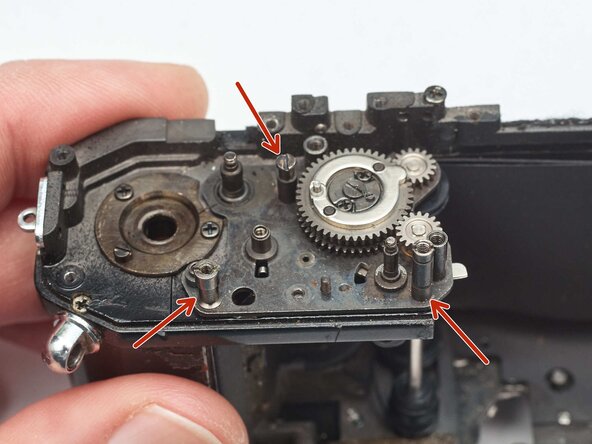
    • Remove three slotted posts.

    • Lift the wind gear plate upward and out of the chassis.

    • The curtains and curtain pinions are attached to the plate and will come away with it.

    Ask FixBot

    Add Comment

  51. Pentax MX Shutter Assembly Removal, Installation Notes: Shutter Assembly: step 52, image 1 of 2 Pentax MX Shutter Assembly Removal, Installation Notes: Shutter Assembly: step 52, image 2 of 2
    • Note the position of the curtains. The closing curtain (left) should sit in front of the opening curtain (right).

    • Note the routing of the curtain strings. The opening curtain strings should run behind the plastic rollers.

    • The upper string is kept in place by a metal tab that covers the roller.

    • Install the wind gear plate first, making sure that the curtain strings are properly routed as it is put in place.

    • Install the roller shafts second.

    Ask FixBot

    Add Comment

Conclusion

To reassemble your device, follow these instructions in reverse order.

Cancel: I did not complete this guide.

Sam Gustafson

Member since: 09/01/22

11,000 Reputation

78 Guides authored

0 Guide Comments

Add Comment

View Statistics:

Past 24 Hours: 1

Past 7 Days: 29

Past 30 Days: 52

All Time: 67