
Pentax MX Main PCB Removal

Sam Gustafson and one other contributor
Last updated on Jul 8, 2026
Views: 286
View statistics:
- Past 24 Hours:
- 3
- Past 7 Days:
- 17
- Past 30 Days:
- 83
- All Time:
- 286
Comments: 0
No one has left comments on this guide. Will you be first?
Go to guide commentsCompleted: 0 1
No one has marked this guide "completed." Will you be the first?
1 person has marked this guide "completed." It's you — great job!
Favorites: 0 1
No one has favorited (and subscribed to) this guide. Will you be the first?
1 person has favorited (and subscribed to) this guide — and that's you!
Community-Contributed Guide
An awesome member of our community made this guide. It was not created by iFixit staff.
What you need
Tools


-
-
-
Remove the lever cap. The cap is reverse threaded.
-
Lift off the advance lever.
-
Remove the collar beneath the lever.
 Ask FixBot
-
-
-
Set the ISO to 100 and the shutter speed to 1000.
-
Remove one pin head screw.
-
Lift off shutter speed dial.
-
Remove the collar beneath the dial.
-
Installation Notes: Make sure that the tab on the shutter speed resistor mates properly with this slot on the shutter speed dial.
-
-
-
Place a tool in the fork of the rewind shaft. Turn the rewind knob counterclockwise to loosen it.
-
Remove the lock ring underneath the rewind knob.
-
Remove the cover plate.
-
-
-
Remove two M1.7 x 3.2 mm screws.
-
Remove two M1.7 x 2 mm countersunk screws.
-
Lift off top cover.
-
The release cable pin in the shutter button is loose and may fall out.
-
-
-
-
-
Unsolder one blue wire for the LED switch.
-
Unsolder one green wire for the motor drive.
-
Unsolder two yellow wires for the aperture resistor.
-
Unsolder two brown wires for the shutter speed resistor.
-
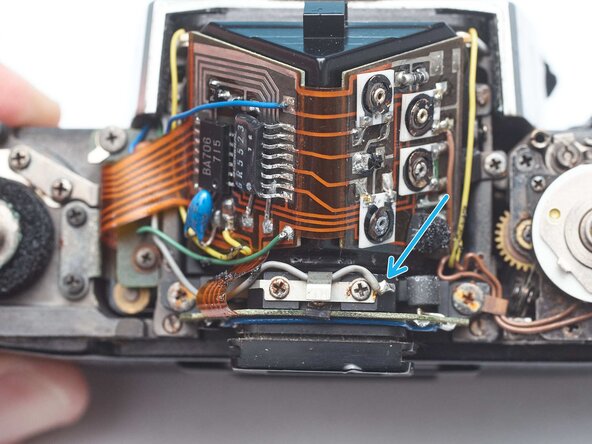
Unsolder one gray wire for flash sync.
-
-
-
Remove one M1.4 x 2.8 mm screw and washer.
-
Remove one M1.7 x 2.8 mm screw.
-
Pull the LED PCB out of the side of the mirror box.
-
-
-
-
Remove two screws.
-
Lift of flash sync connector.
-
Remove one screw.
-
Remove light cell PCB clamp
-
Slide the light cell PCB up and off the eye piece.
-
-
-
Use isopropyl alcohol to loosen the adhesive attaching the PCB to the prism.
-
Use a soft, thin tool to separate the PCB.
-
Lift off the PCB once it is free from the adhesive.
-
-




To reassemble your device, follow these instructions in reverse order.

