
Parrot Skycontroller 2 Battery Replacement

Aaron Collard and 3 other contributors
Last updated on Apr 28, 2020
Views: 3.7K
View statistics:
- Past 24 Hours:
- 3
- Past 7 Days:
- 19
- Past 30 Days:
- 86
- All Time:
- 3,738
Comments: 0
No one has left comments on this guide. Will you be first?
Go to guide commentsCompleted: 1 2
1 person has marked this guide "completed." Will you be next?
2 people have marked this guide "completed." Including you — great job!
Favorites: 0 1
No one has favorited (and subscribed to) this guide. Will you be the first?
1 person has favorited (and subscribed to) this guide — and that's you!
Featured Student Guide
This guide has been the hard work of our awesome students and is found to be exceptionally cool by the iFixit staff.
Introduction
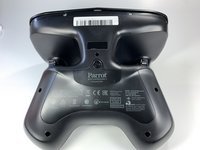
Go to step 1 ↓If you will be working on your Skycontroller 2, it is imperative that you remove the battery at the start. Also, if your Skycontroller 2 is not powering on or holding a charge, it is necessary to replace the battery. To replace the battery, use this guide.
Before beginning, make sure to power off your device completely and disconnect from any external power source.
What you need
Tools


-
-
-
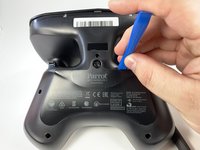
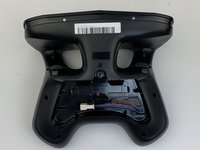
Insert the plastic opening tool into the top of the cover and pry upwards to lift the battery cover.
-
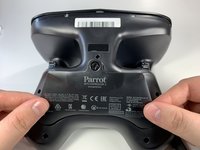
Remove the cover by pulling up and out.
-
-
-
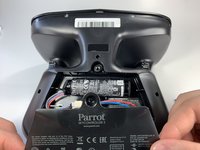
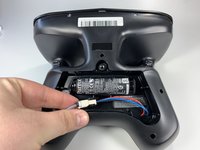
Pull the connectors out by gently pushing the tabs and pulling up on the connector.
-
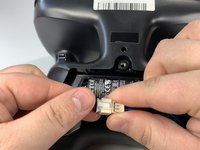
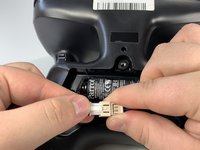
Disconnect the battery from the remote by pressing the white tab and pulling the connectors apart.
-
-
-
-
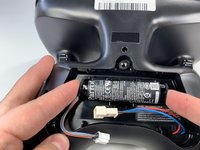
Remove the battery from its brackets by pulling up on the ends of the battery.
-


 Ask FixBot






To reassemble your device, follow these instructions in reverse order.
Cancel: I did not complete this guide.
One other person completed this guide.

Team

Embry-Riddle Aeronautical University, Team S6-G1, Watkins Spring 2020 Member of Embry-Riddle Aeronautical University, Team S6-G1, Watkins Spring 2020
ERAU-WATKINS-S20S6G1
4 Members
60 Guides authored
