Free Shipping on Domestic Orders $75+

Pantech Matrix Speaker Replacement

Views: 610

View statistics:

Past 24 Hours:
3
Past 7 Days:
15
Past 30 Days:
95
All Time:
610
Comments: 0

No one has left comments on this guide. Will you be first?

Go to guide comments
Completed: 0

No one has marked this guide "completed." Will you be the first?

Favorites: 0

No one has favorited (and subscribed to) this guide. Will you be the first?

Time Required: 10 - 15 minutes
Difficulty: Moderate
Pantech Matrix Speaker Replacement

Introduction

Go to step 1 ↓

The speaker of Pantech Matrix C740 functions as the mechanism to allow for hearing whether from calls or videos watched using the Internet; however, faulty functioning of the speaker may cause the device to either not allow sound to be heard at all or not clearly. Therefore, this guide serves as an aid in the replacement of the speaker for the Pantech Matrix C740.

What you need

Tools

  • Spudger
    4.9
  • Phillips #000 Screwdriver
    4.9
    1. Pantech Matrix Speaker Replacement, Phone Orientation: step 1, image 1 of 1
      • Place phone with screen side facing toward you.

      Ask FixBot

      Add Comment

    2. Pantech Matrix Speaker Replacement, Phone Orientation: step 2, image 1 of 1
      • Flip phone over so screen side is now facing down.

      Ask FixBot

      Add Comment

    3. Pantech Matrix Speaker Replacement, Remove Back Cover: step 3, image 1 of 2 Pantech Matrix Speaker Replacement, Remove Back Cover: step 3, image 2 of 2
      • Gently slide the backside phone cover off exposing the battery underneath.

      Ask FixBot

      Add Comment

    4. Pantech Matrix Speaker Replacement, Lift Battery: step 4, image 1 of 1
      • Carefully lift the battery up from where the spudger is pointed.

      Ask FixBot

      Add Comment

    5. Pantech Matrix Speaker Replacement, Remove Battery: step 5, image 1 of 1
      • Remove the battery from its dock.

      Ask FixBot

      Add Comment

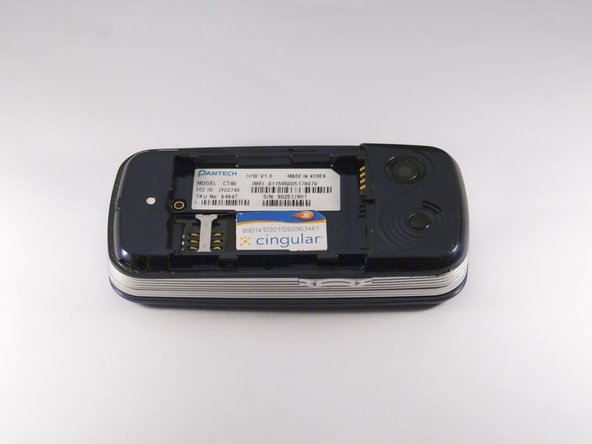
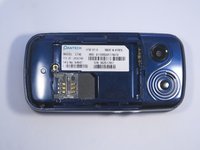
    1. Pantech Matrix Speaker Replacement, Slide SIM Card Out: step 6, image 1 of 3 Pantech Matrix Speaker Replacement, Slide SIM Card Out: step 6, image 2 of 3 Pantech Matrix Speaker Replacement, Slide SIM Card Out: step 6, image 3 of 3
      • Slide the SIM Card out of its dock.

      Ask FixBot

      Add Comment

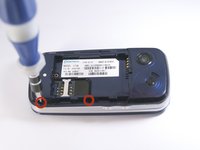
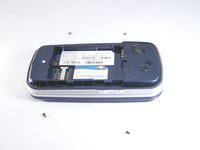
    1. Pantech Matrix Speaker Replacement, Remove Phone Screws: step 7, image 1 of 2 Pantech Matrix Speaker Replacement, Remove Phone Screws: step 7, image 2 of 2
      • Use a Phillips screwdriver to remove the four 2mm Phillips #000 screws from each corner of the device.

      Ask FixBot

      Add Comment

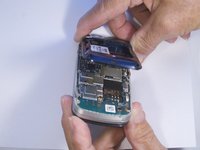
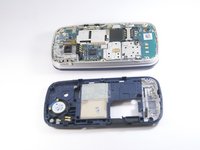
    2. Pantech Matrix Speaker Replacement, Remove Phone Casing: step 8, image 1 of 3 Pantech Matrix Speaker Replacement, Remove Phone Casing: step 8, image 2 of 3 Pantech Matrix Speaker Replacement, Remove Phone Casing: step 8, image 3 of 3
      • Rotate the phone so the base is facing you.

      • Use spudger to separate phone casing and inside as shown.

      • Remove the casing carefully and set aside the rest of the phone.

      Ask FixBot

      Add Comment

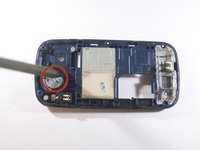
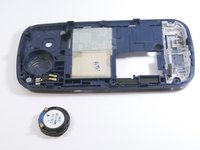
    3. Pantech Matrix Speaker Replacement, Remove Phone Speaker: step 9, image 1 of 2 Pantech Matrix Speaker Replacement, Remove Phone Speaker: step 9, image 2 of 2
      • Place the spudger in the notch on the side of the speaker as shown.

      • Use the spudger to gently pry the speaker loose from its dock.

      • Remove the speaker fully from the phone.

      Ask FixBot

      Add Comment

Conclusion

To reassemble your device, follow these instructions in reverse order.

Cancel: I did not complete this guide.

Zeel Patel

Member since: 10/13/14

1,096 Reputation

9 Guides authored

0 Guide Comments

Add Comment

View Statistics:

Past 24 Hours: 3

Past 7 Days: 15

Past 30 Days: 95

All Time: 610