
Panasonic Lumix DMC-GF2 Back Cover Replacement

Kingsley East and 3 other contributors
Last updated on Dec 13, 2016
Views: 2K
View statistics:
- Past 24 Hours:
- 3
- Past 7 Days:
- 25
- Past 30 Days:
- 97
- All Time:
- 1,999
Comments: 1
1 comment on steps.
Completed: 0 1
No one has marked this guide "completed." Will you be the first?
1 person has marked this guide "completed." It's you — great job!
Favorites: 0 1
No one has favorited (and subscribed to) this guide. Will you be the first?
1 person has favorited (and subscribed to) this guide — and that's you!
Introduction
Go to step 1 ↓This guide requires the use of a screw driver and close attention to which screws need to be removed. While following these steps, be careful not to rip out the blue and yellow ZIF ribbons that attach the back cover to the camera.
What you need
Tools


-
-
-
On the bottom of the camera, use your finger to push the lock button to the open position which will cause the hinged door to swing open.
 Ask FixBot
-
-
-
Push the small black tab that holds the battery with your finger to release the battery.
-
Use your fingers to pull the battery out of the camera.
-
-
-
-
-
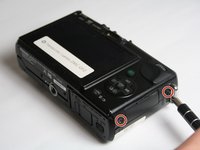
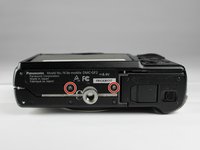
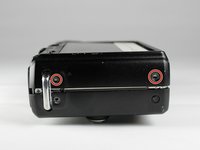
Using a Phillips #00 screwdriver, remove six 2.69mm, silver screws located on the two short sides of the camera and the bottom side.
-
-
-
-
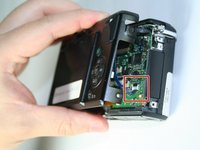
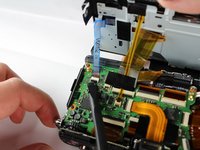
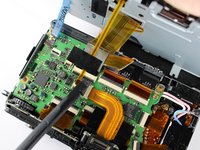
Gently lift up the back cover to access the ZIF connectors for the blue and yellow ribbons.
-
To unlock the ZIF connectors, gently push the black portion of the lock from a flat position to an upright position using a spudger.
-
-
-
Gently push the blue and yellow ribbons out of the unlocked ZIF connectors using your fingers.
-
-
-
Using a Phillips #00 screwdriver, remove the 3.5 mm silver screw from the upper left hand corner of the back cover.
-
-
-
Using a spudger, lift up and remove the plastic cover piece from the back cover.
-
-
-
Using a Phillips #00 screwdriver, remove the 2.69 mm silver screw located beneath the plastic piece that was previously removed.
-
-
-
Using a spudger, lift up and separate the heavier metal cover from the light, plastic back cover.
-
-






To reassemble your device, follow these instructions in reverse order.

Team

Baylor, Team 5-9, Williams Fall 2016 Member of Baylor, Team 5-9, Williams Fall 2016
BU-WILLIAMS-F16S5G9
3 Members
60 Guides authored
