Free Shipping on Domestic Orders $75+

Panasonic Lumix DMC-FX01 Lens Assembly Replacement

Views: 10K

View statistics:

Past 24 Hours:
5
Past 7 Days:
26
Past 30 Days:
113
All Time:
10,485
Comments: 2

2 comments on steps.

Completed: 5

5 people have marked this guide "completed." Will you be next?

Favorites: 5

5 people have favorited (and subscribed to) this guide. Will you be next?

Time Required: 15 minutes
Difficulty: Moderate
Featured Guide

This guide has been found to be exceptionally cool by the iFixit staff.

Panasonic Lumix DMC-FX01 Lens Assembly Replacement

Introduction

Go to step 1 ↓

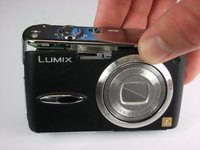
This guide will be useful for anyone who wants to replace a broken or damaged Panasonic Lumix DMC-FX01 lens assembly.

What you need

Tools

    1. Panasonic Lumix DMC-FX01 Lens Assembly Replacement, Battery: step 1, image 1 of 1
      • Locate the memory card and battery card latch on the bottom of the camera.

      • Slide the latch to the open position.

      Ask FixBot

      Add Comment

    2. Panasonic Lumix DMC-FX01 Lens Assembly Replacement: step 2, image 1 of 1
      • Open the battery latch, and slide the battery release lever to the right.

      Ask FixBot

      Add Comment

    3. Panasonic Lumix DMC-FX01 Lens Assembly Replacement: step 3, image 1 of 1
      • Remove the battery from the camera.

      Ask FixBot

      Add Comment

    1. Panasonic Lumix DMC-FX01 Lens Assembly Replacement, Rear Casing: step 4, image 1 of 1
      • Remove the three 4.6 mm screws on the bottom of the camera using a Phillips #00 screwdriver.

      Ask FixBot

      Add Comment

    2. Panasonic Lumix DMC-FX01 Lens Assembly Replacement: step 5, image 1 of 1
      • Remove the single 3.2 mm screw on the left side of the camera using a Phillips #00 screwdriver.

      Ask FixBot

      Add Comment

    3. Panasonic Lumix DMC-FX01 Lens Assembly Replacement: step 6, image 1 of 2 Panasonic Lumix DMC-FX01 Lens Assembly Replacement: step 6, image 2 of 2
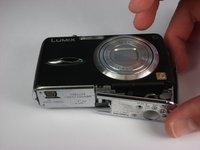
      • Remove the left side casing.

      Ask FixBot

      Add Comment

    4. Panasonic Lumix DMC-FX01 Lens Assembly Replacement: step 7, image 1 of 1
      • Remove the two 3.2 mm screws on the right side of the camera using a Phillips #00 screwdriver.

      Ask FixBot

      Add Comment

    5. Panasonic Lumix DMC-FX01 Lens Assembly Replacement: step 8, image 1 of 1
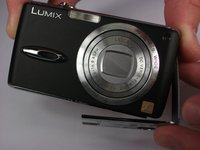
      • Remove the bottom right panel.

      Ask FixBot

      Add Comment

    6. Panasonic Lumix DMC-FX01 Lens Assembly Replacement: step 9, image 1 of 2 Panasonic Lumix DMC-FX01 Lens Assembly Replacement: step 9, image 2 of 2
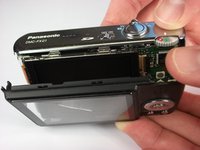
      • Gently remove the back casing.

      • Start at the bottom and carefully pry towards the top to get this piece free.

      Ask FixBot

      Add Comment

    1. Panasonic Lumix DMC-FX01 Lens Assembly Replacement, LCD Screen: step 10, image 1 of 1
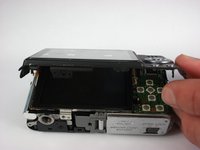
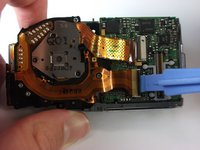
      • Gently lift up the LCD screen.

      • Using a plastic prying tool, flip up the latch that holds the thin ribbon in place.

      • It should fall out on its own or with a gentle tug.

      Ask FixBot

      Add Comment

    2. Panasonic Lumix DMC-FX01 Lens Assembly Replacement: step 11, image 1 of 1
      • Gently tug the thicker ribbon to remove it from its housing.

      Ask FixBot

      Add Comment

    1. Panasonic Lumix DMC-FX01 Lens Assembly Replacement, Front Casing: step 12, image 1 of 2 Panasonic Lumix DMC-FX01 Lens Assembly Replacement, Front Casing: step 12, image 2 of 2
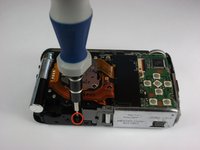
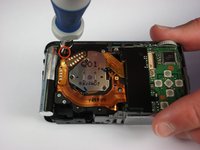
      • Remove the two black 5.4 mm screws that hold in the front faceplate using a Phillips #00 screwdriver.

      • There may be a third screw the the right of the lens assembly.

      Ask FixBot

      Add Comment

    2. Panasonic Lumix DMC-FX01 Lens Assembly Replacement: step 13, image 1 of 3 Panasonic Lumix DMC-FX01 Lens Assembly Replacement: step 13, image 2 of 3 Panasonic Lumix DMC-FX01 Lens Assembly Replacement: step 13, image 3 of 3
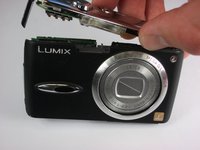
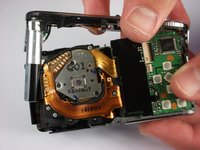
      • Carefully remove the upper assembly, which houses the buttons and the flash battery.

      Ask FixBot

      Add Comment

    3. Panasonic Lumix DMC-FX01 Lens Assembly Replacement: step 14, image 1 of 1
      • Carefully remove the front casing after verifying that the thin plastic around the lens is not still attached.

      Ask FixBot

      Add Comment

    1. Panasonic Lumix DMC-FX01 Lens Assembly Replacement, Lens Assembly: step 15, image 1 of 2 Panasonic Lumix DMC-FX01 Lens Assembly Replacement, Lens Assembly: step 15, image 2 of 2
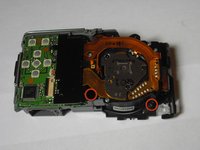
      • Remove the three black 5mm screws attached to the lens frame.

      Ask FixBot

      Add Comment

    2. Panasonic Lumix DMC-FX01 Lens Assembly Replacement: step 16, image 1 of 1
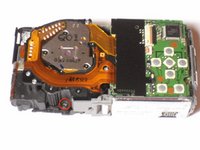
      • Remove the lens frame.

      Ask FixBot

      Add Comment

    3. Panasonic Lumix DMC-FX01 Lens Assembly Replacement: step 17, image 1 of 1
      • Lift out the circuit board as shown.

      Ask FixBot

      Add Comment

    4. Panasonic Lumix DMC-FX01 Lens Assembly Replacement: step 18, image 1 of 2 Panasonic Lumix DMC-FX01 Lens Assembly Replacement: step 18, image 2 of 2
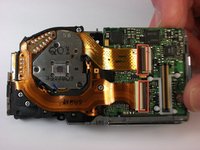
      • Lift the two black latches that hold the connector ribbons in place.

      • Disconnect the two ribbons.

      Ask FixBot

      Add Comment

    5. Panasonic Lumix DMC-FX01 Lens Assembly Replacement: step 19, image 1 of 1
      • Remove the lens assembly as shown.

      Ask FixBot

      Add Comment

Conclusion

To reassemble your device, follow these instructions in reverse order.

Cancel: I did not complete this guide.

5 other people completed this guide.

Steven

Member since: 10/11/10

108 Reputation

2 Guides authored

Team

Cal Poly, Team 9-22, Regan Fall 2010 Member of Cal Poly, Team 9-22, Regan Fall 2010

CPSU-REGAN-F10S9G22

4 Members

96 Guides authored

0 Guide Comments

Add Comment

View Statistics:

Past 24 Hours: 5

Past 7 Days: 26

Past 30 Days: 113

All Time: 10,485