Introduction
If your lens is cracked or broken, follow this guide to replace it. You will need special tools in order to complete this guide. Please refer to the tools to make sure you have what you need. Please be careful of cracked lenses as they could potentially cut you.
What you need
-
-
Remove all screws (Phillips #000 head) from the sides and bottom of the camera.
 Ask FixBot
-
-
-
Remove the back panel. This might require some extra force. If you still can't get the panel off, try to use a plastic opening tool.
-
-
-
Remove the circuit board. You should be able to do this with your fingers. Just grab it and pull upwards. If it does not come, use a plastic opening tool to help.
-
-
-
-
Remove the white plastic cover. This may take some extra force. You will want to try to remove from the bottom side first and peel up.
-
Then, where the silver switch is located, it will slide directly out at the top.
-
-
-
Unscrew one screw (Phillips #000 head)
-
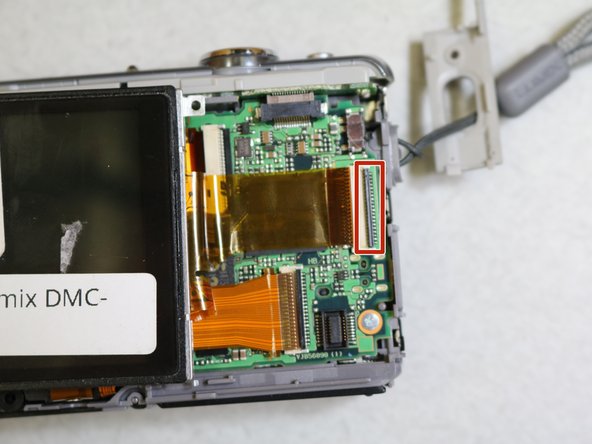
Remove the screen. You will want to use a plastic opening tool to complete this step. Pop the thin black piece of plastic upwards with the opening tool to unlock the plastic film ribbon.
-
Once unlocked, you will be able to pull the ribbon out and remove the screen completely.
-
-
-
Remove the grey panel.
-
You will need to unscrew three screws (Phillips #000 head) in order to remove the panel.
-
-
-
Pop the two thin black pieces of plastic upwards with the opening tool to unlock the plastic film ribbons.
-
Once unlocked, you will need to unscrew six more screws (Phillips #000 head) to completely detach the lens from the rest of the camera.
-
-
-
Remove the lens from the camera carefully. You can do this simply by grabbing it with your fingers and pulling out gently.
-




To reassemble your device, follow these instructions in reverse order.
Cancel: I did not complete this guide.
One other person completed this guide.

Team

Cal Poly, Team 10-7, Banghart Winter 2017 Member of Cal Poly, Team 10-7, Banghart Winter 2017
CPSU-BANGHART-W17S10G7
3 Members
10 Guides authored
