
Panasonic ES-RF31 Battery Replacement

Daniel and one other contributor
Last updated on Feb 28, 2017
Views: 9.6K
View statistics:
- Past 24 Hours:
- 6
- Past 7 Days:
- 36
- Past 30 Days:
- 184
- All Time:
- 9,638
Comments: 6
1 comment on steps, 5 guide comments.
Go to guide commentsCompleted: 9 10
9 people have marked this guide "completed." Will you be next?
10 people have marked this guide "completed." Including you — great job!
Favorites: 0 1
No one has favorited (and subscribed to) this guide. Will you be the first?
1 person has favorited (and subscribed to) this guide — and that's you!
Introduction
Go to step 1 ↓This guide shows you how to replace the battery of the Panasonic ES-RF31. You can find more specs here: http://www.panasonic.com/de/consumer/koe...
What you need
Tools


-
-
-
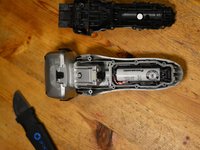
Insert an opening tool into the gap
-
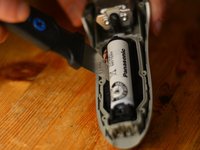
Gently remove the battery cover
-
-


 Ask FixBot


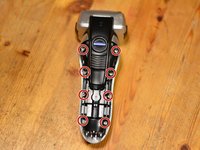
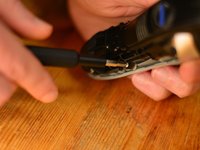


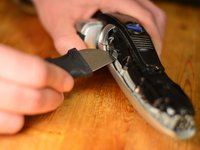
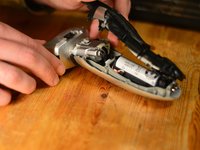


To reassemble your device, follow these instructions in reverse order.
Cancel: I did not complete this guide.
9 other people completed this guide.

Team

5 Guide Comments
Thanks Daniel,
I followed your instructions and all went well. One thing to add: after re-assembly of the (loaded) battery my razor would not turn on. At first I thought of a bad contact, but it turned out that the razor needed a few minutes plugged into the power supply. After that it worked fine. I suspect, that the load-control hardware needs the external power to reset itself.
Cheers, Nils
Daniel, thank you very much for instruction.
Unfortunetly, into shaver I found only 1 battery.
Because used 3.7 v element, I prepared 2 x 1.2 v batteries.
My razor was the Panasonic ES8103S and the disassembly process was similar. From the pictures above, the battery looks the same. My razor actually had a piece under the slide-off cover that was totally rusted so I will just buy a new one on Amazon for $50. For future reference, I would like to know where you get the replacement battery? There is no model number on the battery and I couldn’t find any info online.
