Free Shipping on Domestic Orders $75+

Panasonic EB TX320ASW Battery Replacement

    1. Panasonic EB TX320ASW Battery Replacement, Power Off: step 1, image 1 of 1
      • Power off the phone by pressing and holding the End key.

      Ask FixBot

      Add Comment

    2. Panasonic EB TX320ASW Battery Replacement, Locate Battery Release Tab: step 2, image 1 of 1
      • Flip over the phone.

      • Then, locate the battery release tab.

      Ask FixBot

      Add Comment

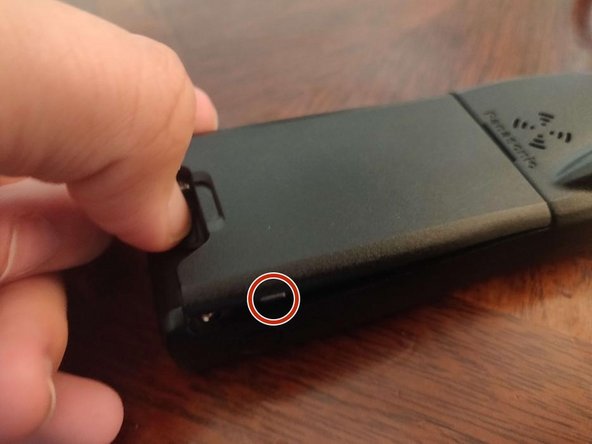
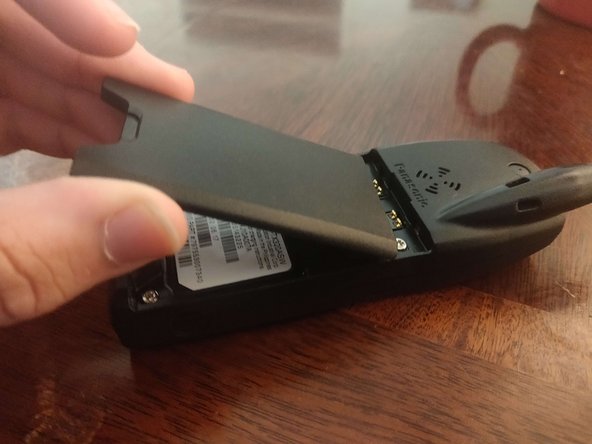
    3. Panasonic EB TX320ASW Battery Replacement, Remove battery: step 3, image 1 of 3 Panasonic EB TX320ASW Battery Replacement, Remove battery: step 3, image 2 of 3 Panasonic EB TX320ASW Battery Replacement, Remove battery: step 3, image 3 of 3
      • With your fingernail, push the battery release tab to the bottom.

      • With another finger, lift on one of the two tabs (one is circled), and continue lifting out the battery.

      • At this point, you can let go of the release tab.

      Ask FixBot

      Add Comment

    4. Panasonic EB TX320ASW Battery Replacement, Success!: step 4, image 1 of 1
      • You have removed your battery!

      Ask FixBot

      Add Comment

Conclusion

To reassemble your device, follow these instructions in reverse order.

Cancel: I did not complete this guide.

One other person completed this guide.

Lee Hunt

Member since: 12/08/16

1,288 Reputation

7 Guides authored

0 Guide Comments

Add Comment

View Statistics:

Past 24 Hours: 3

Past 7 Days: 5

Past 30 Days: 21

All Time: 237