Introduction
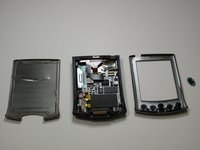
How remove the outer casing
What you need
-
-
-
Heat the left and top edges with hairdryer for one minute.
-
Move hairdryer back and forth to evenly heat up surface.
-
-
-
Tool used on this step:Tweezers$4.99
-
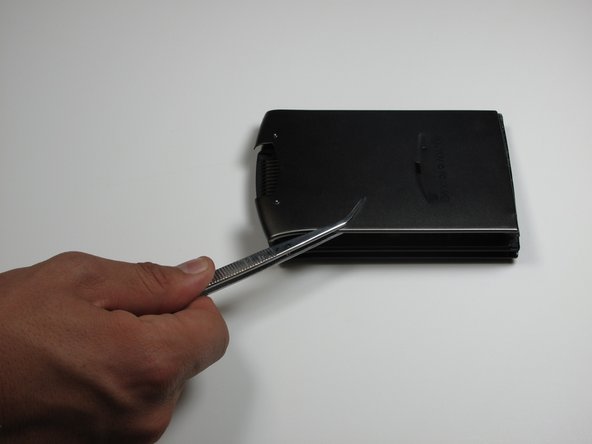
Use tweezers to hold Palm right side down on it's side.
-
Use a plastic opening tool to pry open front and back casing.
-
-
-
Leave plastic opening tools in between front and back casing.
-
Rotate Palm and repeat steps 2 and 3 for right and back edges.
-
-
-
Now pry open front and back casing with plastic opening tools.
-
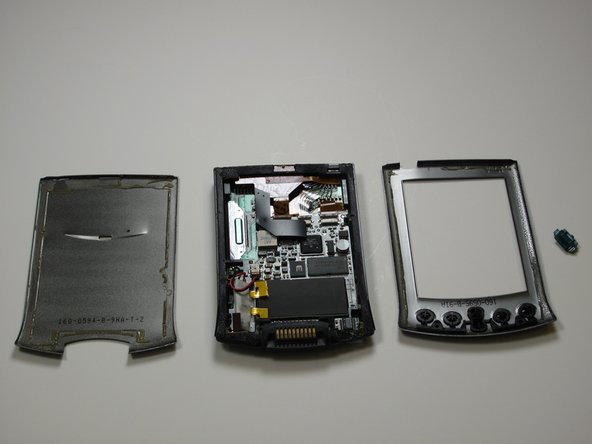
Separate front and back casing completely.
-

 Ask FixBot



Team

Cal Poly, Team 13-25, Maness Winter 2010 Member of Cal Poly, Team 13-25, Maness Winter 2010
CPSU-MANESS-W10S13G25
4 Members
48 Guides authored
1 Guide Comment
So...This given by my grandmother and it is out of battery. Unluckily, it won't charge, because the %#*@ old battery had gone kaput. I had a hard time finding one that might be suitable, and turnout that I need to insert it into the device and connect it to the circuit board. I have some solid soldering skills, but without a heat gun, the andonized cover won't come off. And what's more, I jammed a pencil tip into the "reset" hole when trying to reset the device. Thinking the big opening was a kind of cover-releasing button...I was just having a whole lot of trouble and thinking too much. !&&*.
