Introduction
This guide will provide instructions and visuals on how to replace the display screen.
What you need
-
-
-
Using a Torx 5 screwdriver, remove the four screws located on the rear cover of the device by turning counterclockwise. Set aside screws.
-
-
-
-
Carefully lift up the circuit board, which will also lift up the screen. Do so carefully to prevent breaking the connectors.
-
-
-
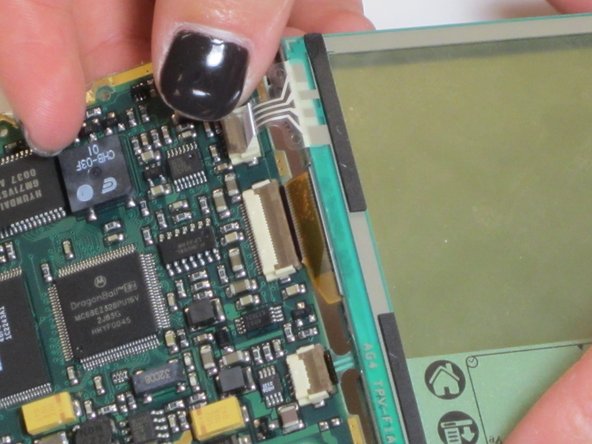
Unplug the three connectors located on the right side of the circuit board with great caution and care.
-
Slide the cables out gently using a spudger
-
Separate the screen from the board.
-

 Ask FixBot


To reassemble your device, follow these instructions in reverse order.

Team

James Madison, Team 1-3, Allen Fall 2011 Member of James Madison, Team 1-3, Allen Fall 2011
JMU-ALLEN-F11S1G3
5 Members
60 Guides authored
