
Palm Zire m150 Screen Replacement

Last updated on May 17, 2016
Views: 921
View statistics:
- Past 24 Hours:
- 1
- Past 7 Days:
- 18
- Past 30 Days:
- 88
- All Time:
- 921
Comments: 0
No one has left comments on this guide. Will you be first?
Go to guide commentsCompleted: 0 1
No one has marked this guide "completed." Will you be the first?
1 person has marked this guide "completed." It's you — great job!
Favorites: 0 1
No one has favorited (and subscribed to) this guide. Will you be the first?
1 person has favorited (and subscribed to) this guide — and that's you!
Better Introduction
Improve this guide by completing or revising its introduction.
What you need
Tools

-
-
-
Lift the flap on the Palm Zire M150 to see the back and all of the screws.
 Ask FixBot
-
-
-
Use the T6 bit screw driver, and carefully remove the screws at the top of the device.
-
-
-
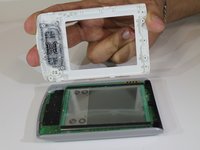
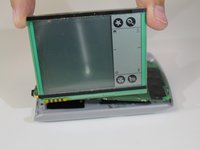
Turn the device over with the screen facing up. Gently pull the top and bottom cover from the device, as shown in the second photo.
-
-
-


To reassemble your device, follow these instructions in reverse order.

Team

USF Sarasota-Manatee, Team 1-3, Stewart Spring 2016 Member of USF Sarasota-Manatee, Team 1-3, Stewart Spring 2016
USFSM-STEWART-S16S1G3
5 Members
72 Guides authored
