Free Shipping on Domestic Orders $75+

Palm IIIc Button Pad Replacement

What you need

  1. Palm IIIc Button Pad Replacement, Removing broken LCD screen: step 1, image 1 of 1
    • Keep track of all pieces removed from the device.

    • Gently pull off the device cover. The cover snaps on and off easily where the cover attaches to the Palm IIIc device

    Ask FixBot

    Add Comment

  2. Palm IIIc Button Pad Replacement: step 2, image 1 of 1
    • Using a Phillips head screwdriver, take out the four screws on the back of the device. You may have to pull them out with your hands once they are unscrewed.

    • There will be two long screws and two short screws. The long screws come from the top of the device, and the short screws come from the bottom of the device.

    Ask FixBot

    Add Comment

  3. Palm IIIc Button Pad Replacement, Remove the Front Cover: step 3, image 1 of 1
    • Lay Palm IIIc face-up and remove the front cover.

    • Do this firmly but not with too much force so as to not break or disturb anything you're not supposed to.

    Ask FixBot

    Add Comment

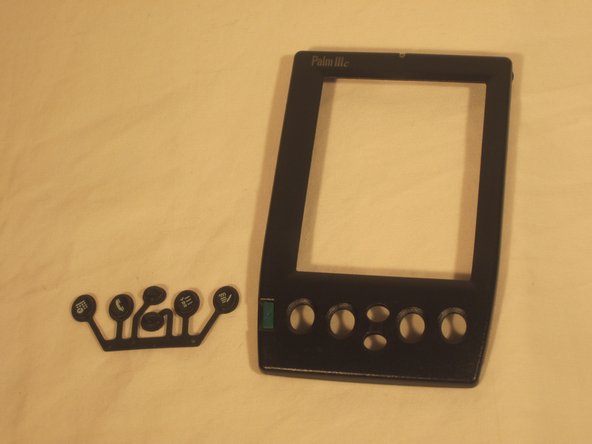
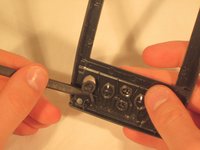
  4. Palm IIIc Button Pad Replacement, Button Pad: step 4, image 1 of 2 Palm IIIc Button Pad Replacement, Button Pad: step 4, image 2 of 2
    • Using a prying tool, carefully pop button pad out of the cover.

    Ask FixBot

    Add Comment

  5. Palm IIIc Button Pad Replacement: step 5, image 1 of 1
    • Insert the new button pad where the old one used to be.

    Ask FixBot

    Add Comment

Conclusion

To reassemble your device, follow these instructions in reverse order.

Cancel: I did not complete this guide.

Paulina Trujillo

Member since: 04/07/11

286 Reputation

8 Guides authored

Team

Cal Poly, Team 20-69, Walters Spring 2011 Member of Cal Poly, Team 20-69, Walters Spring 2011

CPSU-WALTERS-S11S20G69

5 Members

8 Guides authored

0 Guide Comments

Add Comment

View Statistics:

Past 24 Hours: 1

Past 7 Days: 11

Past 30 Days: 55

All Time: 1,708