
PSP 300xc Front Case Replacement

Matthew Newsom and 3 other contributors
Last updated on Jul 18, 2016
Views: 5.4K
View statistics:
- Past 24 Hours:
- 4
- Past 7 Days:
- 28
- Past 30 Days:
- 140
- All Time:
- 5,397
Comments: 0
No one has left comments on this guide. Will you be first?
Go to guide commentsCompleted: 3 4
3 people have marked this guide "completed." Will you be next?
4 people have marked this guide "completed." Including you — great job!
Favorites: 2 3
2 people have favorited (and subscribed to) this guide. Will you be next?
3 people have favorited (and subscribed to) this guide — including you!
Introduction
Go to step 1 ↓Make you PSP 3000c like new again by replacing your beat up front case with a shiny new one!
What you need


-
-
-
Press the button securing the battery door to the PSP 300xc, and lift the battery door off.
-
Lift the battery out of the PSP.
 Ask FixBot
-
-
-
-
-
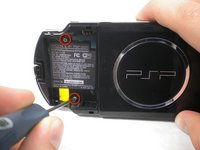
Use a spudger or your fingernail to remove the warranty sticker stuck to the inside of the battery tray
-
-
-
-
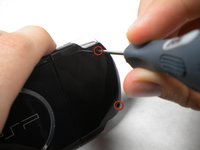
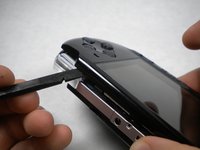
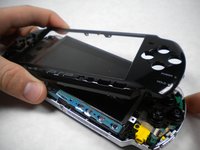
Insert a spudger between the front case and PSP, and slide the spudger along the perimeter of the front case to remove it.
-
-




To reassemble your device, follow these instructions in reverse order.
Cancel: I did not complete this guide.
3 other people completed this guide.

