
Osmo Mobile Charging Port Replacement

William Tyler Wills and 3 other contributors
Last updated on Dec 13, 2017
Views: 4.1K
View statistics:
- Past 24 Hours:
- 6
- Past 7 Days:
- 37
- Past 30 Days:
- 125
- All Time:
- 4,056
Comments: 12
9 comments on steps, 3 guide comments.
Go to guide commentsCompleted: 0 1
No one has marked this guide "completed." Will you be the first?
1 person has marked this guide "completed." It's you — great job!
Favorites: 0 1
No one has favorited (and subscribed to) this guide. Will you be the first?
1 person has favorited (and subscribed to) this guide — and that's you!
Introduction
Go to step 1 ↓If the device does not charge and the battery is functional, you may have a broken charging port. This guide will demonstrate the steps needed to replace a broken charging port.
What you need
Tools
-
-
-
Spudger4.9


-
-
-
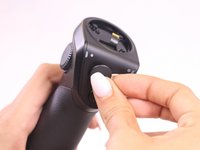
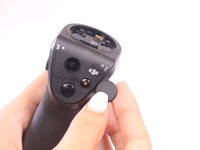
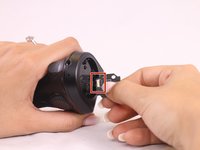
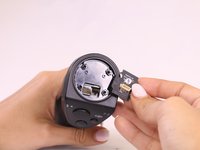
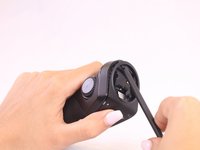
Remove gimbal from base handle by loosening round plate found at the top of the handle.
 Ask FixBot
-
-
-
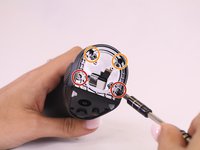
Use Phillips #00 screwdriver to remove the three screws found on the gimbal stabilizer to detach handle from gimbal.
-
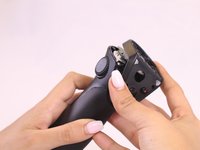
Carefully detach handle from gimbal and disconnect the cable that connects the two.
-
-
-
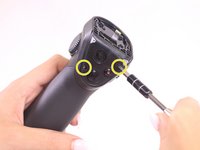
Locate the hex screws found at the top base of the handle, and unscrew using the 1.5mm hex screwdriver.
-
-
-
Tool used on this step:Tweezers$4.99
-
Remove the quick release PCBA by locating the connecting wires and release the ribbon cable with tweezers.
-
Use the spudger to pry open and remove the face plate, starting at the back of the handle.
-
-
-
Locate four screws directly on top of handle.
-
Unscrew the silver, bottom two screws, that are closest to the face plate using the 00 screwdriver.
-
Unscrew the black, top two screws, located furthest from the face plate, using the 0 screwdriver.
-
Remove the remaining two screws found on the front of the faceplate.
-
Remove the rest of the face plate shell.
-
-
-
-
-
Remove the top left screw on the joystick panel with Phillips #00 screwdriver.
-
Lift faceplate holding joystick module.
-
-
-
Remove the bottom right screw on the joystick panel with the #00 Phillips screwdriver.
-
-
-
Hold down the larger of the two ribbon cables, and pull on circuit board with a constant and careful down and out motion.
-
-
-
Remove the two screws from the green charging module and the two screws on the grey plate and remove from handle.
-
Replace charging module.
-
-








To reassemble your device, follow these instructions in reverse order.

Team

USF Tampa, Team S2-G1, Nance Fall 2017 Member of USF Tampa, Team S2-G1, Nance Fall 2017
USFT-NANCE-F17S2G1
4 Members
72 Guides authored
3 Guide Comments
Where can I buy a replacement port? Can’t find one with google.
Where can I buy the part. ?
