Free Shipping on Domestic Orders $75+

Oregon Scientific Meep! X2 Battery Replacement

What you need

    1. Oregon Scientific Meep! X2 Battery Replacement, Rear Casing: step 1, image 1 of 1
      • Remove the orange covers from the left and right sides of the device by sliding up against the tabs.

      Ask FixBot

      Add Comment

    2. Oregon Scientific Meep! X2 Battery Replacement: step 2, image 1 of 3 Oregon Scientific Meep! X2 Battery Replacement: step 2, image 2 of 3 Oregon Scientific Meep! X2 Battery Replacement: step 2, image 3 of 3
      • You can remove the rear casing by unscrewing all six phillips #00(3.5mm x 4.5mm)screws from the left and right side of the device.

      Ask FixBot

      Add Comment

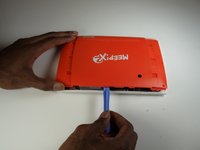
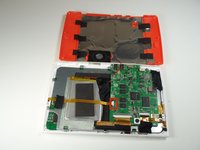
    3. Oregon Scientific Meep! X2 Battery Replacement: step 3, image 1 of 3 Oregon Scientific Meep! X2 Battery Replacement: step 3, image 2 of 3 Oregon Scientific Meep! X2 Battery Replacement: step 3, image 3 of 3
      • Use the plastic opening tools to undo the clips around the edges of the device.

      Ask FixBot

      Add Comment

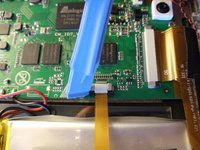
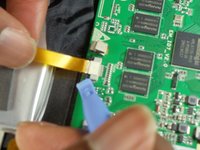
    1. Oregon Scientific Meep! X2 Battery Replacement, Remove the ribbon cable.: step 4, image 1 of 3 Oregon Scientific Meep! X2 Battery Replacement, Remove the ribbon cable.: step 4, image 2 of 3 Oregon Scientific Meep! X2 Battery Replacement, Remove the ribbon cable.: step 4, image 3 of 3
      • Gently unhook the black security clips to loosen the ribbon cable. Use one of the plastic opening tools.

      • Pull lightly on the ribbon cable to remove it.

      Ask FixBot

      Add Comment

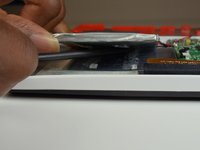
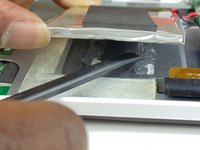
    2. Oregon Scientific Meep! X2 Battery Replacement, Sever the adhesive glue on the battery.: step 5, image 1 of 2 Oregon Scientific Meep! X2 Battery Replacement, Sever the adhesive glue on the battery.: step 5, image 2 of 2
      • Use your spudger to separate the battery from the adhesive glue strips and plastic film.

      Ask FixBot

      Add Comment

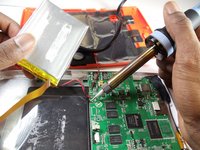
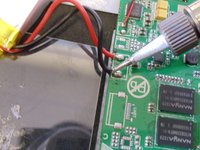
    3. Oregon Scientific Meep! X2 Battery Replacement: step 6, image 1 of 2 Oregon Scientific Meep! X2 Battery Replacement: step 6, image 2 of 2
      • Use a soldering station to unsolder the battery wires from the motherboard.

      • In the case of screen or screen sensor replacement, disregard desoldering steps.

      Ask FixBot

      Add Comment

Conclusion

To reassemble your device, follow these instructions in reverse order.

Cancel: I did not complete this guide.

J'mel Henneman

Member since: 01/20/15

864 Reputation

8 Guides authored

Team

USF Tampa, Team 9-1, Blackwell Winter 2015 Member of USF Tampa, Team 9-1, Blackwell Winter 2015

USFT-BLACKWELL-W15S9G1

3 Members

96 Guides authored

0 Guide Comments

Add Comment

View Statistics:

Past 24 Hours: 1

Past 7 Days: 6

Past 30 Days: 28

All Time: 1,885