Introduction
Follow the steps in this guide to replace the broken microphone of your Oregon Scientific Meep! 4.0 tablet.
What you need
-
-
-
Use a screwdriver to remove the four 7.0 mm Philips #00 screws from the back of the device.
 Ask FixBot
-
-
-
-
-
-
Use a screwdriver to remove the three 7.0 mm Philips #00 screws and unscrew the motherboard.
-
-
-
Use a plastic opening tool to release the three ribbon cables attached to the motherboard.
-
-
-
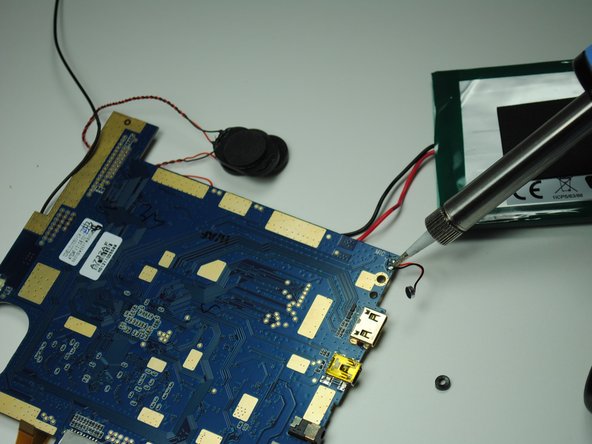
Lift up the motherboard and use a soldering station to remove the microphone from its wires.
-
-


To reassemble your device, follow these instructions in reverse order.

Team

University of Tampa, Team 1-3, Whiteside Fall 2015 Member of University of Tampa, Team 1-3, Whiteside Fall 2015
UT-WHITESIDE-F15S1G3
3 Members
72 Guides authored
